

How to Promote Your Etsy Shop With Your Own Website?


You post a new listing on Instagram. A follower taps the link and lands on your Etsy page.
Right below your product, Etsy shows them five similar items from other shops. Some are cheaper. One has more reviews. Your follower leaves with someone else’s candle.
That’s the hidden cost of sending people straight to Etsy. You did the marketing, and Etsy put your competitors in front of your buyer. If that buyer came through one of Etsy’s Offsite Ads, you may also pay up to 15% on the sale.
A website fixes this. It doesn’t replace Etsy. It gives your shop a home base where buyers meet your brand first, see only your products, and then check out on Etsy through a link that saves you money.
This guide shows you exactly how to set that up with WordPress.
Quick answer: To promote your Etsy shop with your own website, build a WordPress site on your own domain and join Etsy’s Share & Save program. Then display your listings on your pages with trackable links back to Etsy. Your website brings in visitors through blog content, email, and social media. Etsy handles the checkout, and you get a fee refund on those orders.
Why Promote Your Etsy Shop Through Your Own Website?
A website gives your marketing a destination you control. When you send followers straight to Etsy, they land on a marketplace that also shows them other sellers’ products. A website lets visitors meet your brand and see only your products first. They click through to Etsy when they’re ready to buy.
Sellers have documented how Etsy steers shoppers toward similar items. They’ve reported Etsy testing listing titles that link back to search results for competing items. On a listing page, your buyer is always one click from a competitor.
There’s a cost side too. Sellers in Etsy’s forums say Offsite Ads fees feel hidden and hit low-priced items hardest, because the fee is charged on the order total. Traffic you bring in yourself avoids that problem.
Etsy’s Rules for Linking to Your Own Website
Yes.
Etsy lets sellers link to their own website, blog, and social profiles, as long as they aren’t urging buyers to leave Etsy to make a purchase. These links are only clickable on your shop’s About page. Linking from your website to Etsy is always fine.
What Etsy’s off-platform transaction rules don’t allow:
- Encouraging buyers to purchase an item from your Etsy shop through another venue
- Making offers to buy or sell outside Etsy, or using a QR code to send people off the platform
- Completing a transaction off Etsy that started on Etsy
A simple rule to follow: Traffic can flow from your website to Etsy freely. Don’t use your Etsy shop to pull buyers out to your website for checkout.
How much does Etsy charge when it promotes your shop?
Etsy’s Offsite Ads charge a fee when one of Etsy’s ads on Google, Facebook, Instagram, Pinterest, or Bing leads to a sale within 30 days.
- Under $10,000 in annual sales: the fee is 15%, and you can opt out.
- Over $10,000 in annual sales: the fee is 12%, and you can’t opt out.
The fee is capped at $100 per order. You set and pay for Etsy Ads, the on-site ads, separately as a daily budget.
What is Etsy share & save?
Share & Save is an Etsy program that refunds part of your fees when you bring in your own buyers. After you enroll, if a buyer places an order within 30 days of clicking a link you shared, you get an instant 4% refund on the eligible order total.
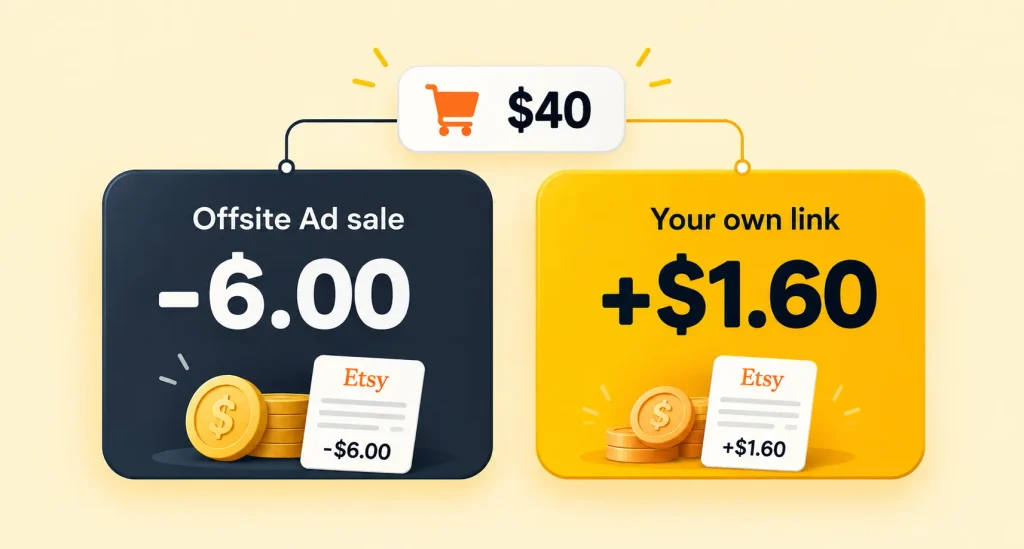
Here’s what the two programs mean for a $40 order (rates as of October 2026):
| How the buyer arrived | Effect on your fees |
| Clicked an Etsy Offsite Ad (15% tier) | You pay about $6.00 |
| Clicked your Share & Save link | You get $1.60 back |
Things to know before you join:
- You can’t use both programs: Sellers in Etsy’s Affiliate Program or Creator Co can’t also join Share & Save.
- Link format matters: Links need to follow the yourshopname.etsy.com format to count. Link shorteners are fine if they point to that format.
- Watch Pinterest: When the program launched, some sellers had their Pinterest accounts restricted after posting the trackable links.
Get access to our exclusive offers and pro tips!
Tutorial: Promote Your Etsy Shop on WordPress
You don’t need a big website to promote your Etsy shop. You need a few pages that show off your products and give people a reason to visit.
This tutorial walks you through the full setup. You’ll get your site running, join Etsy’s Share & Save program, put your listings on your pages, and promote Etsy products through content.
Step 1: Set up WordPress on your own domain
Use a WordPress site on your own domain rather than Etsy’s Pattern builder. WordPress gives you full control over design, content, and SEO, and your site doesn’t depend on Etsy’s product decisions.
A starter site only needs five pages:
- Home: what you make, plus your best sellers
- Shop: your featured Etsy listings
- Blog: content that ranks on Google
- About: your story and process
- Email signup: on every page
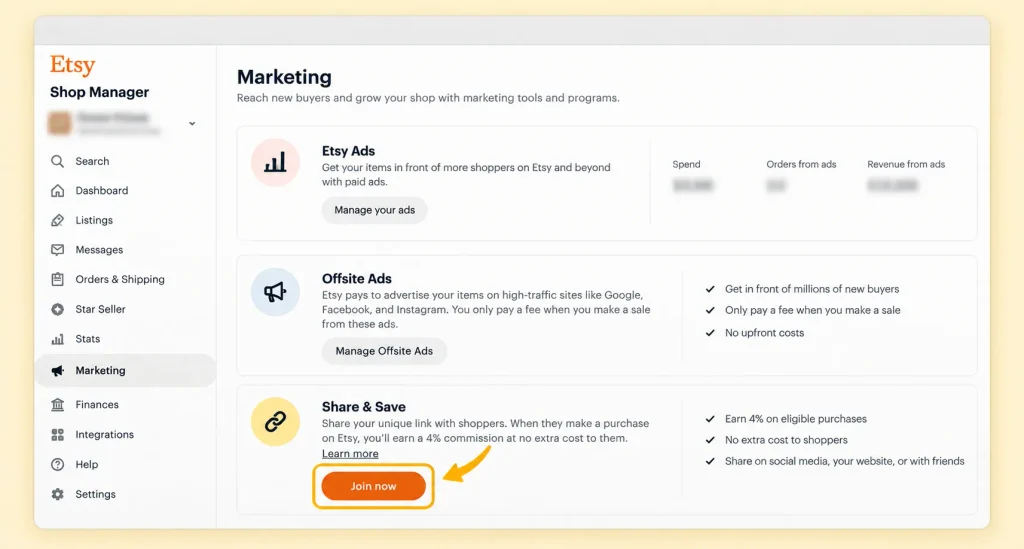
Step 2: Join Share & Save before sharing any links
Enroll first, because clicks don’t earn the refund while you’re not enrolled.
- Open Shop Manager and go to Marketing.
- Select Share & Save.
- Click Join now.
Your trackable shop link then appears in Shop Manager and on the Share & Save page. Use it for every link from your website. Etsy’s Share & Save help page has the full details.
Step 3: Display your Etsy listings with AzonPress
AzonPress is an affiliate marketing plugin for WordPress, made by WPManageNinja.
Its Custom Product with Zero API feature fetches product data from Etsy, Amazon, and eBay when you paste in a product link, with no API credentials. It’s built for affiliates, but the same feature lets Etsy sellers show their own listings as product boxes, grids, or tables.
If you’re new to this, our guide on how to display affiliate products on WordPress covers the basics.
To add an Etsy listing:
- Go to Custom Products in the WordPress sidebar or AzonPress navbar.
- Click Add Custom Product.
- Select Single/Multiple Product Template.
- Paste your Etsy listing URL into the URL field and click Continue.
- Click the pencil icon to edit the product details or swap the image.
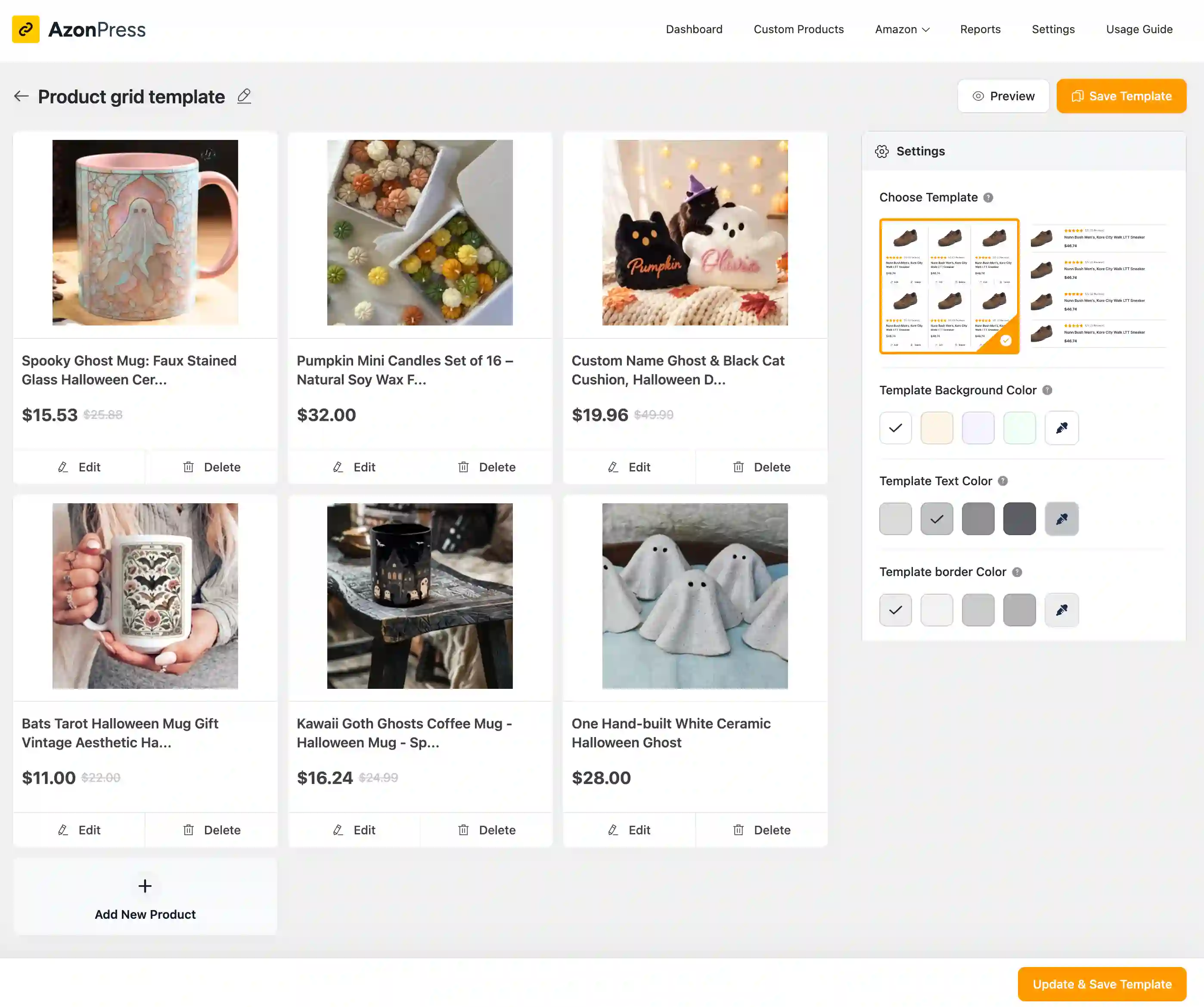
Settings worth turning on: in the template settings, enable Open Links in New Window so visitors keep your site open while they browse Etsy. You’ll also find Link Redirect Type, Use No Follow on Links, Add additional Rel Attribute Tags, and Add Link Query Params there.
Placing listings on your pages: each custom product gets its own shortcode you can paste into any page or post. You also get a cloaked URL you can reuse in blog posts and emails.
You can choose from Grid, Box, List, Table, and Widget layouts, and manage every cloaked link from Link Management.
Why this beats a plain “Visit my Etsy shop” button: a visitor sees the actual product, photo, and price on your page. They only click through when they’re already interested. That’s a warmer visit than a cold social click.
The same approach works for other marketplaces too. See how to promote eBay products without an API.
Manage links, create product tables, and comparison tables, and increase your affiliate revenue
Step 4: Publish content for your Etsy listings
Etsy listings compete for product searches like “lavender soy candle.” A blog can rank for the questions people ask before they buy: gift ideas, how-tos, care guides, and comparisons. Each post can feature a few relevant listings.
Example for a candle shop:
- “Best Housewarming Gifts Under $50” (with a comparison table of your candles)
- “How to Make a Soy Candle Burn Evenly”
- “Soy vs Paraffin Candles: What’s the Difference?”
- “Candle Scents That Suit Small Apartments”
A comparison table works especially well for gift guides. Readers can compare size, scent, and price side by side, then click straight to the listing they want.
Our guide on creating a custom product table walks through the setup. For more on why comparison content converts, see how to compare products for higher conversions.
Step 5: Build an email list you own
An email list is the one customer channel Etsy doesn’t control. Offer something worth signing up for, like early access to new collections, a coupon for their next Etsy order, or behind-the-scenes updates.
When you launch new products, email subscribers with Share & Save links to the listings. These people already know your work, so they tend to buy more readily than cold traffic.
Step 6: Send social traffic to your website first
Social media clicks often don’t turn into sales, because people scrolling a feed usually aren’t ready to buy. Link your posts to a blog post or collection page on your site instead of straight to Etsy. Visitors learn about your work without competitor listings around them, then click to Etsy when they’re ready.
This also helps with Pinterest. Pinning your own website pages, instead of Share & Save links directly, avoids the account restrictions some sellers reported.
For more traffic channels that don’t feel spammy, see 10 non-scammy ways to promote links and how to get traffic for affiliate marketing. Most of the tactics apply to Etsy sellers too.
Step 7: Add social proof to your website
First-time visitors need reasons to trust an independent site. Add:
- Customer photos and testimonials, used with the buyer’s permission
- Your Etsy sales count and years selling, in your About section
- Craft fairs, press mentions, and collaborations
A visible link to your Etsy shop also builds trust, since buyers know Etsy’s purchase protection covers their order.
Step 8: Track clicks and sales
Measure two things:
- Clicks from your site to Etsy. The AzonPress Advanced Report Dashboard shows link clicks, so you can see which pages and products send the most visitors. Our guide to link tracking explains what to watch.
- Orders on Etsy. Check Etsy Stats for traffic sources, and your Share & Save refunds for orders that came from your links.
How to read the results: if a post gets clicks but few sales, look at the listing itself (price, photos, shipping). If a post gets visitors but few clicks, the featured products don’t match what readers came for.
Common mistakes when promoting an Etsy shop
- Sending cold traffic straight to listings: Visitors who aren’t ready to buy rarely convert.
- Posting only product promos on social media: Sellers in Etsy’s forums say accounts that only post shop updates struggle to gain or keep followers.
- Dropping shop links in Reddit communities: Many niche subreddits dislike self-promotion. Share useful content instead.
- Sharing links before joining Share & Save: Those orders won’t earn the refund.
- Using your Etsy shop to send buyers to your website for checkout: It breaks Etsy’s off-platform rules.
Final thoughts
Etsy is good at finding buyers for your listings. It isn’t built to help you build your own brand. A WordPress website fills that gap: your content and email list bring people to you, Etsy handles the checkout, and Share & Save refunds part of your fees.
Start small, pick your five best sellers, add them to one WordPress page with AzonPress, join Share & Save, and publish one gift guide that features them.


Frequently Asked Questions
Here are some frequently asked questions regarding “how to promote Etsy shop”
1. Do I need a website to sell on Etsy?
No. Etsy gives you a storefront and marketplace search traffic. A website becomes worth it once you market outside Etsy, through social media, email, or a blog, and want that traffic to land somewhere you control.
2. Can I sell the same products on Etsy and my own website?
Yes. Many sellers list the same products in both places. Etsy’s rule is about behavior, not inventory: don’t use your Etsy shop to encourage buyers to purchase elsewhere.
3. How do I embed my Etsy listings on WordPress?
Use a plugin that fetches product data from Etsy. With AzonPress, add a Custom Product, paste the Etsy listing URL, and place the generated shortcode on any page or post.
4. Can I use AzonPress if I join Etsy Share & Save?
Yes. Share & Save excludes sellers in Etsy’s own Affiliate Program or Creator Co. AzonPress is a WordPress plugin, not an Etsy program, so using it to display your listings doesn’t affect your Share & Save eligibility.
5. Does promoting my Etsy shop on social media work?
It works best when social posts link to your website first. Buyers then arrive on Etsy already interested, instead of browsing alongside competitor listings.



Read Similar Blogs
We build lasting partnerships to boost and manage revenue growth



Leave a Reply