

7 Best WordPress Cache Plugins for Affiliate Websites in 2026


If you run an affiliate site, you already know speed is not optional. A visitor who bounces before your comparison table loads never clicks your affiliate link, and Google notices the slow load too.
So you install a cache plugin. Simple enough, until you realize a week later that your Amazon price boxes are showing last month’s prices, or worse, your affiliate tracking cookies stopped firing, and your commissions quietly dropped without any error message telling you why.
That’s the part most roundups of WP cache plugins skip. They test load times and call it a day.
But a WordPress caching plugin that’s great for a static blog can actively work against you on an affiliate site, because affiliate sites have pockets of content that need to stay dynamic while everything else gets cached hard.
This guide covers the 7 best WordPress cache plugins for affiliate websites, what each one actually does well, where it falls short, and how to set up caching so your site loads fast without breaking the two things that pay your bills: accurate prices and working tracking links.
Key takeaways
- Page caching gives you the biggest speed boost, but it’s also the layer most likely to hurt an affiliate site if left on default settings, since it freezes prices, stock status, and tracking cookies until the cache expires.
- A cached page can silently stop your affiliate tracking cookie from firing, because the PHP that sets it never runs when a static snapshot is served instead.
- Stale prices aren’t just a UX problem. Programs like Amazon Associates expect accurate, current pricing, so caching pricing pages for too long can create a compliance issue.
- The best cache plugin for an affiliate site isn’t necessarily the fastest one. It’s the one that gives you the most control over what gets cached and what stays live, through URL/cookie exclusion, ESI support, or a shorter TTL on pricing pages.
- WP Rocket, LiteSpeed Cache, and FlyingPress are strong picks depending on your hosting and technical comfort, but every plugin on this list needs its exclusion rules configured, not just installed and left on default.
- If you pull live Amazon data through a plugin like AzonPress, your cache plugin needs to work alongside that data instead of freezing it, so double-check compatibility before committing to one.
A quick overview of WordPress cache plugins
| Plugin | Best for | Price | Affiliate-specific strength |
| WP Rocket | Easiest setup overall | From $59/year | Simple exclusion rules for price boxes |
| LiteSpeed Cache | LiteSpeed hosting | Free | ESI lets you cache the page but not the price widget |
| FlyingPress | Core Web Vitals | From $60/year | Best for review and comparison-heavy pages |
| WP Fastest Cache | Budget premium | Free / $59 one-time | Solid URL and cookie exclusion |
| W3 Total Cache | Advanced control | Free / from $99/year | Granular caching for large sites |
| WP Super Cache | Simple free option | Free | Reliable, low learning curve |
| Swift Performance | Large affiliate sites | Free / from $57 | Aggressive preload for hundreds of pages |
What a WordPress cache plugin does on affiliate websites
Before comparing options, let’s break down what these plugins actually do. Because on an affiliate site, not every part of that process works in your favor.
Think of a cache plugin as a plugin that takes a snapshot of your page and hands out that snapshot to every visitor instead of rebuilding the page from scratch each time.
That’s faster. But a snapshot doesn’t update itself. Whatever was true the moment it was taken stays true until the snapshot expires, even if the real page has changed since then.
A cache plugin for WordPress usually works across three layers:
Page caching
This is the “snapshot” layer, and it’s where most of the speed boost comes from. WordPress normally rebuilds a page every time someone visits: running PHP, querying the database, assembling the HTML. Page caching skips all that by saving a finished HTML copy and serving it directly.
Here’s the catch for affiliate sites: that snapshot freezes everything on the page. Prices, stock status, and even the script that sets your affiliate tracking cookie. If a visitor gets served the cached snapshot, that tracking script never actually runs, so no cookie gets set. This is the layer that causes most affiliate-related caching problems.
Browser caching
This tells a visitor’s browser to save your CSS, JS, and image files locally, so their next visit loads faster. It doesn’t touch your prices, stock data, or tracking scripts, so there’s low risk here for affiliate content.
Object caching
This saves the results of database queries so WordPress doesn’t have to run the same query twice. If your site pulls in Amazon product data or affiliate feed info, object caching can speed that up without you noticing any downside.
So here’s the core issue in one line: page caching is the layer that gives you the most speed, but it’s also the layer most likely to hurt your affiliate revenue if left on default settings.
On a regular blog, caching everything for 24 hours is harmless. On an affiliate site, that same setting can mean a visitor sees a price from three days ago, or worse, gets served a page where the tracking cookie never fires at all.
That’s why the right cache plugin for your affiliate site isn’t just about speed. It’s about how easily you can control what gets frozen in the snapshot and what stays live.
Why caching strategy matters more on affiliate sites
Two things make affiliate sites different from a typical WordPress caching plugin use case.
Affiliate tracking can break silently. If a full page gets served from cache before your affiliate plugin’s PHP executes, the tracking cookie that attributes a sale to you never gets set. There’s no error, no warning, just a slow leak in your commissions that’s hard to trace back to a caching plugin.
Stale prices are a compliance issue, not just a UX problem. Programs like Amazon Associates require you to display accurate, current pricing, and a cache plugin holding a page for hours or days can put you on the wrong side of that requirement without you realizing it.
The safest approach is refreshing cached affiliate pages every 1 to 2 hours rather than caching them indefinitely.
That’s why picking the best caching plugin for WordPress on an affiliate site comes down to exclusion controls more than raw speed.
You want a plugin that lets you exclude specific URLs, cookies, or content blocks from the cache, not just one that gets a good PageSpeed score in a demo.
Get access to our exclusive offers and pro tips!
What to look for in a cache plugin for affiliate sites
A few criteria matter more here than they would on a typical blog:
- URL and cookie exclusion: Can you tell the plugin to skip caching on specific pages, or exclude a specific cookie, like your affiliate tracking cookie, from being cached at all? This is the single most important feature on this list.
- Content-block exclusion or ESI support: Some plugins let you cache the rest of the page while keeping one specific piece, like a price box, dynamic. That way you get the speed of caching without freezing the one element that actually needs to stay current.
- Auto-refresh scheduling: Look for a TTL (time to live) setting you can shorten for pages with pricing or stock data. A 24-hour default is fine for a blog post, but too long for anything showing a price.
- Compatibility with comparison and product plugins: If you use something like AzonPress to pull live Amazon product data into your posts, your cache plugin needs to work alongside that data rather than freeze it in place.
- Ease of setup: Not every affiliate marketer wants to hand-edit .htaccess rules just to exclude one page from caching. If a plugin requires a developer to configure it safely, that’s worth knowing up front.
- Price: Several genuinely good free WordPress cache plugins exist, so paying for a premium plugin isn’t automatically necessary. Budget only matters once the other criteria are covered.
With that context, here are the 7 best WP cache plugins for affiliate websites.
1. WP Rocket

WP Rocket cache plugin is the first site owners land on, and for good reason. It activates most of its optimizations the moment you install it, so you get real speed gains without touching a single setting. For an affiliate marketer who wants to focus on content rather than server configuration, that matters.
Standout features
- One-click activation with sensible defaults already on
- Automatic caching and optimization setup
- Simple exclusion rules by URL or cookie, easy to protect price widgets and tracking scripts
- Built-in lazy loading and file optimization
- Compatible with major CDNs
Limitations
- No free version, so you can’t test it without paying
- You will need to use a separate plugin or CDN to optimize images
- Less granular than W3 Total Cache for advanced server-level tuning
What it’s best for: Affiliate marketers who want strong results with minimal technical setup.
Pricing: From $59/year for a single site.
2. LiteSpeed Cache
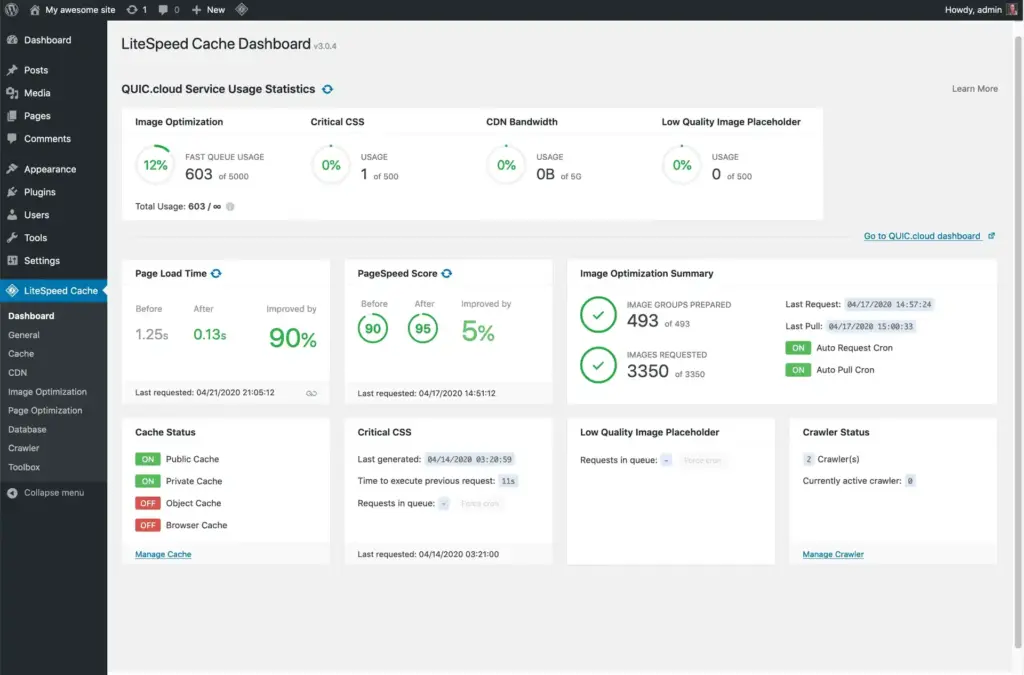
If your host runs on LiteSpeed servers, this is usually the strongest free cache plugin for WordPress available, full stop. LiteSpeed Cache integrates directly with the server rather than relying purely on PHP, which makes it noticeably faster than plugin-only alternatives on compatible hosting.
Standout features
- Server-level caching via LiteSpeed’s built-in engine, faster than PHP-based caching
- ESI (Edge Side Includes) lets you cache a full page while keeping specific blocks, like a live price widget, dynamic
- Free image optimization and CDN integration (QUIC.cloud)
- Regularly updated with strong community support
Limitations
- Most of its speed advantage disappears if you’re not on a LiteSpeed server
- ESI setup requires a bit of a learning curve for beginners
- Interface has a lot of settings, which can overwhelm first-time users
What it’s best for: Affiliate sites hosted on LiteSpeed servers that need dynamic price blocks without sacrificing page speed.
Pricing: Free. Optional paid QUIC.Cloud CDN plans available.
3. FlyingPress
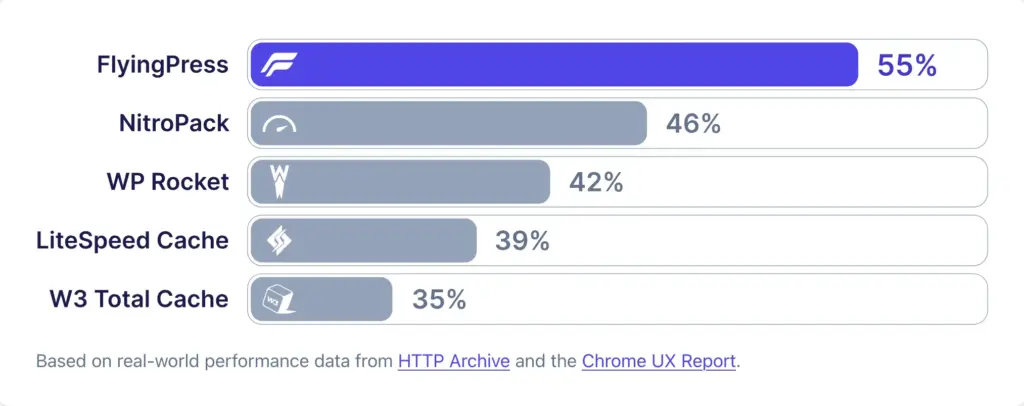
FlyingPress has built a strong reputation among performance-focused WordPress users, particularly for Core Web Vitals. For content-heavy affiliate and review sites with lots of images and comparison tables, this is one of the fastest WordPress cache plugin options for actually moving the needle on Google’s ranking-relevant speed metrics.
Standout features
- Critical CSS generation and unused CSS removal
- Font optimization and link preloading
- Clean, simple interface that doesn’t bury advanced settings in menus
- FlyingCDN integration for global sites
Limitations
- No free tier
- Smaller plugin ecosystem and fewer third-party tutorials than WP Rocket
- Aggressive optimization settings can occasionally conflict with page builders if not configured carefully
What it’s best for: Image and review-heavy affiliate sites chasing better Core Web Vitals scores.
Pricing: From $59/year.
4. WP Fastest Cache
WP Fastest Cache has been a dependable, budget-friendly caching plugin for WordPress for years. The free version alone covers most of what a smaller affiliate site needs, and the premium version is a one-time fee rather than a subscription, which appeals to site owners running multiple affiliate properties.
Standout features
- Straightforward exclude rules by page, cookie, or user agent
- Mobile-specific caching
- Cache timeout settings for all or specific pages
- One-time payment option instead of a recurring subscription
- Minify and combine CSS/JS out of the box
Limitations
- Interface feels dated compared to WP Rocket or FlyingPress
- No customer support included with either the free or paid version
- Less effective at Core Web Vitals optimization than newer plugins
What it’s best for: Budget-conscious affiliate site owners who want a one-time cost instead of a subscription.
Pricing: Free, or $49 for a single-site lifetime license.
5. W3 Total Cache
W3 Total Cache is a cache plugin for WordPress most associated with granular control. It handles page, object, browser, and database caching all from one dashboard, which makes it a strong pick for larger affiliate sites, particularly ones running WooCommerce-based comparison stores alongside affiliate content.
Standout features
- Deep control over what gets cached at every layer (page, object, database, browser)
- Redis and Memcached support for object caching
- CDN integration built in
- Multiple cache methods (Redis, Memcached, etc)
- Free version is genuinely capable, not just a stripped-down trial
Limitations
- Steep learning curve; this is not a plug-and-play option
- Poor default settings can slow a site down if configured incorrectly
- Pro version hasn’t kept pace with newer competitors on Core Web Vitals features
What it’s best for: Larger, more technical affiliate sites that need fine-grained caching control.
Pricing: Free, Pro from $99/year.
6. WP Super Cache
WP Super Cache is built by Automattic. It’s one of the most widely installed free WordPress speed optimization plugins out there, mostly because it does one thing well without trying to be everything at once. It generates static HTML files and serves those instead of processing PHP on every request.
Standout features
- Simple, static-file-based caching that’s easy to understand
- Offers three different caching modes for various server setups.
- Reliable URL exclusion for pages you don’t want cached
- Low resource overhead
- Backed by a large, active user base
Limitations
- Fewer built-in optimization features (no minification or lazy loading)
- Interface feels basic next to premium alternatives
- Limited support for advanced setups like ESI
What it’s best for: Simpler affiliate sites that want a reliable free WordPress cache plugin without a lot of extra features to configure.
Pricing: Free.
7. Swift Performance
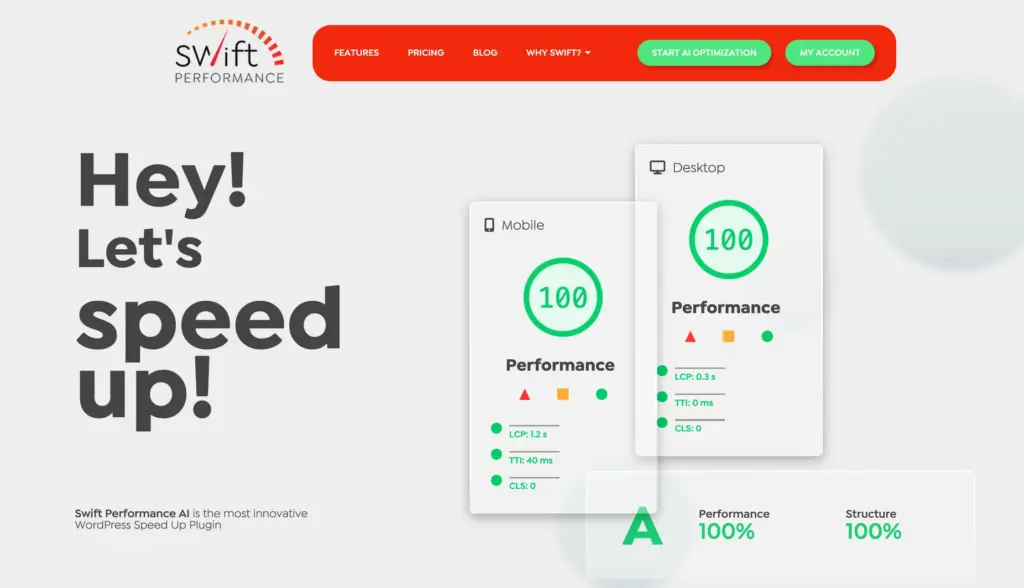
Swift Performance is known for its aggressive preload function, which is particularly useful if your affiliate site has hundreds of comparison or review pages that need to stay cached and ready before a visitor even lands on them.
It’s considered a powerful WP rocket alternative for its useful free features and comprehensive premium version.
Standout features
- Setup wizard to simplify the initial configuration process.
- Aggressive preloading, strong for sites with many pages and lower traffic per page
- Advanced image optimization built in
- CSS/JS combine feature with an unusually clear interface for choosing what gets combined
- Free version is capable enough for smaller sites
Limitations
- Pro version’s interface can feel complex for first-time users
- Smaller community than WP Rocket or LiteSpeed, so fewer troubleshooting resources
- Occasional compatibility issues with heavier page builders
What it’s best for: Affiliate sites with a large number of pages and moderate traffic per page.
Pricing: Free, Pro starts from $49.99year.
Full comparison of these cache plugins
| Plugin | Free version | Starting price | Exclusion granularity | Best for |
| WP Rocket | No | $59/year | URL, cookie | Easiest setup |
| LiteSpeed Cache | Yes | Free (paid CDN optional) | URL, cookie, ESI | LiteSpeed hosting |
| FlyingPress | No | $60/year | URL, cookie | Core Web Vitals |
| WP Fastest Cache | Yes | $59.99 one-time | URL, cookie, user agent | Budget premium |
| W3 Total Cache | Yes | $99/year | URL, object, database | Advanced control |
| WP Super Cache | Yes | Free | URL | Simplicity |
| Cache Enabler | Yes | Free | URL, post type | Lightweight sites |
| Swift Performance | Yes | $57/year | URL, cookie | Large page count |
| Powered Cache | Yes | $69/year | URL, cookie, query string | Tracking parameters |
If you’re weighing the two most common matchups: in a WP Rocket vs WP Fastest Cache comparison, WP Rocket wins on ease of use and default optimization, while WP Fastest Cache wins on price if you want a one-time cost.
In a WP Rocket vs WP Super Cache comparison, WP Rocket offers more built-in optimization, but WP Super Cache is free and still reliable for a simpler affiliate site.
And for W3 Total Cache vs WP Rocket, it comes down to control versus convenience: W3 Total Cache gives you more dials to turn, and WP Rocket gets you most of the way there with none of the setup time.
How to exclude affiliate elements from cache
Whichever plugin you choose, the setup steps look roughly the same:
- Identify your dynamic blocks. This usually means price widgets, stock status indicators, comparison tables, and any countdown or deal timer. If you’re pulling live Amazon data through a plugin like AzonPress, that product block is exactly what you want to protect from long cache windows.
- Set a shorter TTL for pages containing those blocks, rather than caching them at your site-wide default. One to two hours is a reasonable starting point for pricing content.
- Exclude your affiliate tracking cookie from the cache rules so cached pages don’t interfere with attribution. Most plugins have a dedicated field for this under exclusion or advanced settings.
- Use ESI or a similar fragment-caching feature if your plugin supports it (LiteSpeed Cache is the strongest option here), so you can keep the full page cached while the price block itself stays live.
- Test with an incognito window after setup to confirm the tracking cookie still sets on a fresh, cached page.
And if something looks off after a plugin update or a site change, knowing how to clear cache plugin on WordPress settings quickly is worth bookmarking.
Nearly every plugin on this list has a one-click “clear all cache” button in the admin bar or plugin settings, and it’s the first thing to try whenever a page seems to be showing outdated information.
FAQs
Ques: Does caching break affiliate links?
Ans: It can, if your cache plugin serves a fully static page before the PHP that sets your tracking cookie runs. Excluding the relevant cookie or using a plugin with ESI support avoids this.
Ques: What’s the best free WordPress cache plugin for a small affiliate site?
Ans: LiteSpeed Cache if you’re on LiteSpeed hosting; otherwise, WP Super Cache or WP Fastest Cache are both solid.
Ques: Is there a good WP Rocket alternative that’s free?
Ans: LiteSpeed Cache is the closest free alternative in terms of overall capability, especially if your host supports it.
Ques: How often should affiliate pages refresh from cache?
Ans: Every 1 to 2 hours is a reasonable default for any page displaying pricing, since it keeps you closer to compliant with programs like Amazon Associates while still getting most of the speed benefit of caching.
Final recommendation
- Want the easiest setup with no technical fuss: WP Rocket
- On LiteSpeed hosting and want it free: LiteSpeed Cache
- Chasing Core Web Vitals for a review-heavy site: FlyingPress
- On a tight budget: WP Fastest Cache or WP Super Cache
- Running a large, complex affiliate site: W3 Total Cache or Swift Performance
There’s no single best WordPress cache plugin for every affiliate site; it depends on your hosting, your page count, and how much of your content depends on staying dynamic.
What matters more than the plugin itself is setting up the exclusion rules correctly from day one, so speed gains don’t come at the cost of a broken tracking cookie or a stale price nobody catches until a reader points it out in the comments.





Read Similar Blogs
We build lasting partnerships to boost and manage revenue growth


Leave a Reply