

What is Your Preferred Associates Store ID in Amazon?


When I created my Amazon Associates account for the first time, I stumbled on a field that asked for my “Preferred Associates Store ID.” I paused for a moment to understand exactly what this was.
Do I need to come up with a perfect name right now? Can I change this later? Will this affect my earnings?
If you’ve had the same questions, you’re not alone. This little setup often confuses new affiliates, but the thing is, it’s one of the simplest parts of setting up your account.
Your store ID is basically your affiliate identity, the tag Amazon uses to track your sales and reward you with commissions.
In this blog, I’ll walk you through what your Preferred Associates Store ID is, why it matters, and how you can choose the right one without stressing too much.
Quick answer:
Your preferred associates store ID is just the main Tracking ID Amazon hands you when you join the Associates program. Think of it as your username, something like coffeelover-20, where the number at the end tells Amazon which country’s program you’re in. You don’t need a perfect name on day one, and once it’s set, Amazon won’t let you change the store ID itself, though you can always add new Tracking IDs under it later (more on that further down).
What is a preferred associates store ID in Amazon?
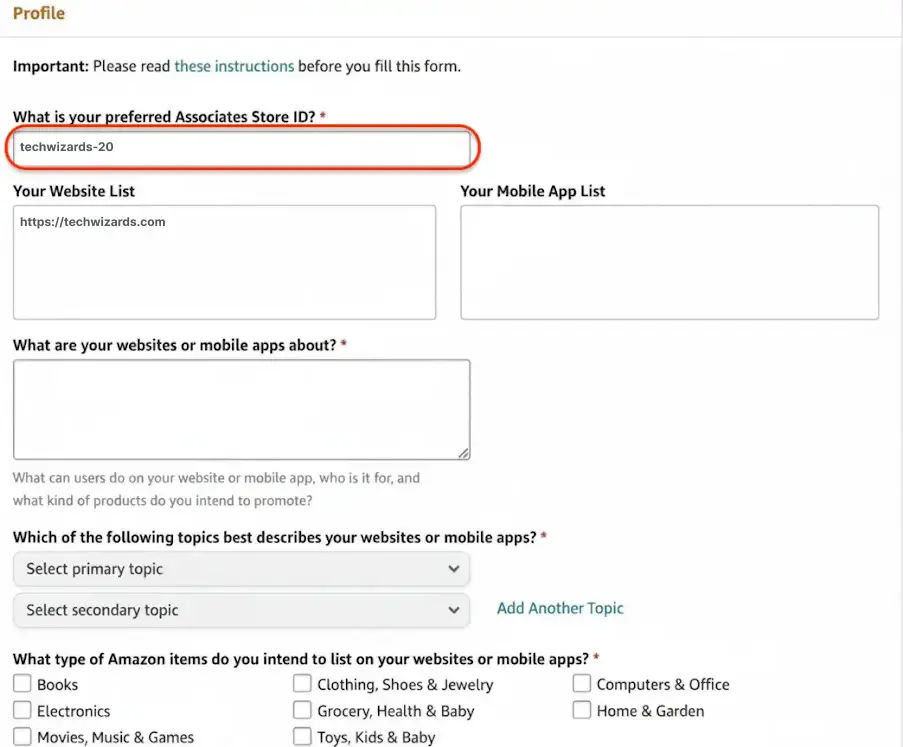
When you’re applying to join the Amazon Associates Program, and the “complete your profile” section asks you to enter your store ID, the first question that arises in your mind is, “What is a preferred associated store ID?
Your preferred associates store ID is like your username in the Amazon affiliate world. It’s a unique identifier Amazon uses to know that “you sent this customer, so you get the commission.”
I remember when I first saw this field, I thought it was going to be some complicated technical thing. But it’s just a name tag for your affiliate business.
When someone clicks your affiliate link and buys something on Amazon, your preferred associates store ID tells Amazon’s system, “Give this commission to Sarah,” or whoever you are.
Without this ID, Amazon cannot determine who deserves credit for the sale.
Your Amazon preferred associates store ID is essentially your business name within the Amazon ecosystem. It appears in your affiliate links and serves as your tracking code across all Amazon marketplaces where you’re approved.
The store ID typically follows a simple format: your chosen name plus a number and country code. For example, if you choose “techreviews” as your preferred name, your full associates store ID in Amazon might look like “techreviews-20” for the US marketplace.
Preferred associates store ID vs Tracking ID: what’s the difference?
Your preferred associates store ID is your main account identifier. You only get one per Amazon Associates account, and it stays with you for as long as you’re in the program.
A tracking ID is something you build on top of that. Amazon lets you create up to 100 of them under the same store ID, and each one just tags a different traffic source so you can see what’s actually working.
Here’s the easiest way to think about it. Your store ID is your company name. Your tracking IDs are the different departments inside that company. The store ID stays fixed. The tracking IDs change depending on what you’re tracking.
| Factors | Preferred associates store ID | Tracking ID |
|---|---|---|
| What it is | Your main, default identifier | A sub-ID built on top of your store ID |
| How many do you get | One per account | Up to 100 per account |
| Example | coffeelover-20 | coffeelover-blog-20 |
| What it’s for | Identifying your whole Associates account | Tracking a specific website, platform, or campaign |
| Can you change it | No, Amazon won’t change your store ID once it’s set | Yes, create or delete tracking IDs anytime |
If you don’t set up any tracking IDs, your preferred associates store ID does double duty as your only tracking ID too. That’s the case for most beginners, and it’s perfectly fine to start there.
Once you’re running multiple sites, a YouTube channel, or an email list and want to know which one is actually driving sales, that’s when tracking IDs start to earn their keep.
I’ve got a full breakdown on creating and managing those in What is Amazon Affiliate Tracking ID? How to Create Them, if you want to go deeper on that side of things.
Amazon preferred associates store ID: country-specific ID suffixes
When you input your preferred associated store ID in Amazon, you’ll see that it ends with a number. For example, mostly -20 or -21.
It’s because Amazon has separate programs for different countries, and each one has its own little code at the end of your ID.
In the US, your Amazon preferred associates store ID gets a “-20” stuck on the end. So if you choose “coffeelover,” you end up with “coffeelover-20” as your complete ID.
Similarly, if you want to promote products in the UK, you’ll end up with “-21,” and so does Germany.
Here is a short list of Amazon Associates Tracking ID suffixes by region:
- United States → -20
- Canada → -20 (same as US, but separate program)
- United Kingdom → -21
- Germany → -21
- France → -21
- Italy → -21
- Spain → -21
- Netherlands → -21
- Sweden → -21
- Poland → -21
- Egypt → -21
- Japan → -22
- India → -21
- Brazil → -20
- Mexico → -20
- Australia → -22
- Singapore → -21
- Saudi Arabia → -21
- UAE (United Arab Emirates) → -21
- Turkey → -21
It may seem random, but that’s just how Amazon organized its system.
You can’t just use your US store ID in other countries. You need to apply separately for each Amazon program you want to join.
But you can usually pick similar names, so if “coffeelover-20” works in the US, you might get “coffeelover-21” in the UK and “coffeelover-22” in Japan.
Best practices for choosing a preferred associates store ID
Let me share some lessons I’ve learned, along with tips from other affiliates, over the years. Here are some things you should keep in mind while choosing your preferred associates store ID for Amazon.
Don’t overthink it, but don’t underthink it either. Keep it related to your niche/site.
- If your site is about tech gadgets → techgadgets-20.
- If it’s about fitness gear → fitnesshub-20.
- If you’re doing kitchen reviews → kitchenstuff-20 makes more sense than “johnsmith123.”
Make it something you can live with. Make it short & easy to remember.
- Avoid long or confusing names that you’ll hate typing later.
- Good: homedeals-20.
- Bad: allthebesthomedecorproductreviews-20.
Skip the personal name route.
I see newbies use their full names all the time. While Amazon allows it, your links end up looking like “amazon.com/dp/B08XYZ?tag=johnsmith-20” which doesn’t scream “professional affiliate” to me.
Keep it simple. Avoid complicated combinations of numbers and letters.
- Stick to letters only. No spaces, underscores, or symbols.
- Good: outdoorlife-20.
- Bad: outdoor_life-20 or outdoor-life!-20.
Choose a brand-friendly approach.
- If you already have a website, just use the domain name as your preferred associates store ID.
- Example: For a site called “GearBuzz,” → gearbuzz-20.
- For “Travel Smart” → travelsmart-20.
Avoid trademark trouble
- Don’t use Nike, Apple, or any brand names in your ID.
- Amazon may overlook it at first, but it could create issues for you in the future.
Think about the long game and future-proof your choice.
- Don’t limit your choice to a tiny niche if you plan to expand.
- Instead of gamingmouse-20, choose gamingdeals-20.
- Instead of yogamats-20, go with fitnessgear-20.
One last thing, say it out loud. If you can’t easily tell someone your store ID over the phone without spelling it out letter by letter, maybe pick something else.
Preferred associates store ID examples
Following these ideas, let me share some practical and effective preferred associates store ID examples across different niches. These examples should give you inspiration for creating your own store ID.
Beauty and skincare: If you’re an Amazon affiliate in the beauty niche, keep your store ID clear and niche-focused. Examples like “beautyfinds-20,” “skincaretips-20,” or “makeupreviews-20” instantly tell visitors what your content is about and help your brand feel consistent.
Fitness enthusiasts: “homegymlife-20,” “fitnessgear-20,” and “workoutguide-20” are popular choices. One of my fitness blogger friends uses “sweatystuff-20,” which I thought was creative and memorable.
Travel bloggers: Affiliates working in the travel niche, store IDs like “travelstuff-20,” “wanderlust-20,” and “tripguide-20” are common. Something like “packinglist-20” might work great for gear recommendation posts.
Tech reviewers: “techfinds-20,” “gadgetguy-20,” “digitalstuff-20,” and “techonbudget-20” are everywhere in this niche.
Home and garden crowd: Affiliate marketers in this niche might choose IDs like “homecomfort-20,” “gardenlife-20,” or “diyproject-20.”
Sports and outdoors: This is one of the most popular and profitable niches for an Amazon affiliate marketer. Preferred associates store ID examples such as “outdoorgear-20,” “sportsstuff-20,” “athleticlife-20,” and “campingcrazy-20” cover a lot of ground.
Most successful affiliates choose an Amazon Preferred Associates Store ID that is simple, relevant, and flexible enough to grow with their content. Think of these examples as inspiration; your Store ID should ultimately reflect your unique brand and content direction.
Get access to our exclusive offers and pro tips!
How do I find my Amazon preferred associates store ID
So you set up your account, picked a store ID, and now you can’t remember what you chose? Happens to the best of us. Now, where to find the preferred associates store ID?
Once you’ve created your account, finding your Store ID is straightforward, though the location might not be immediately obvious if you’re new to the Amazon Associates dashboard.
There are multiple ways to find your preferred associates store ID in Amazon.
Amazon Associates dashboard: Check your Amazon Associates dashboard first. Log in and look around the top of your main page or in the account settings area. Your Amazon preferred associates store ID should be right there, probably near your account info.
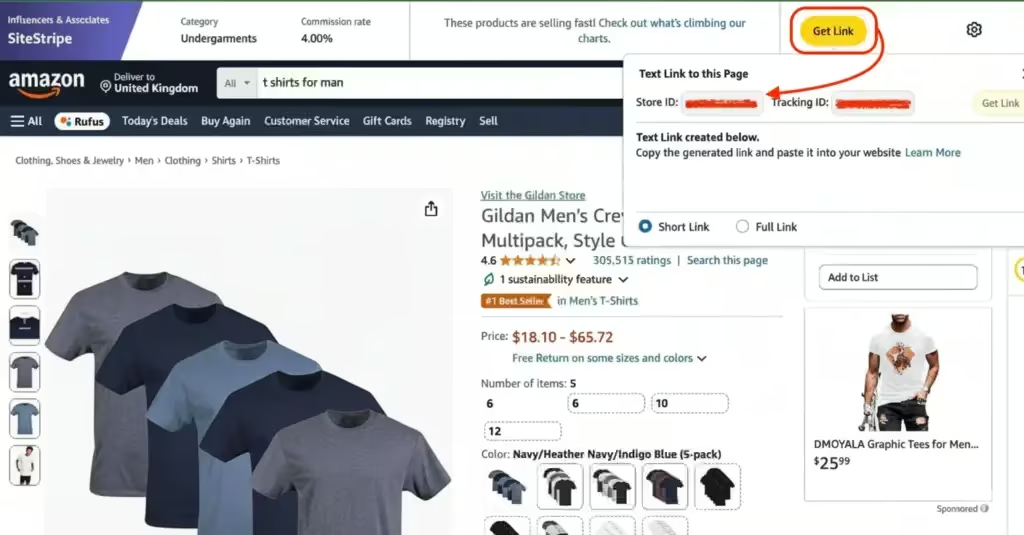
Amazon’s website: You can also find your store ID on Amazon’s website. If you’re logged in to your associate’s account, the SiteStripe browser extension will appear on the product page.
Click on the “Get Link” button, and you’ll find your “Store ID” and “Tracking ID” there.
In your affiliate links: Every affiliate link you generate contains your store ID. Look for the tag that comes after “tag=” in any of your Amazon affiliate URLs. Whatever comes after that is your Amazon Associates store ID.
Example: amazon.com/dp/B08XYZ?tag=techwizard-20
Mobile app users: The Amazon Associates app shows your store ID in your profile section. Pretty handy if you’re managing your affiliate stuff on the go.
For affiliates managing multiple websites or niches, Amazon lets you create additional store IDs under the same account. You can find the option to add new store IDs in your account management section.
Preferred associates store ID FAQs
A few questions keep coming up around this topic, so let’s knock them out here.
Can I change my preferred associates store ID later?
Not directly. Amazon’s own help center is pretty clear on this. Once your Associates ID is set, it won’t change for you, and the country suffix is added automatically. If you want a different name to show up in your links, the easy fix is to create a new tracking ID under your existing store ID instead of trying to change the store ID itself
Does my preferred associates store ID affect my earnings?
No, not directly. Your commission rate is set by Amazon based on the product category you’re promoting, not by what you named your store ID. The name itself has zero pull on how much you earn per sale.
Do I need to pick the perfect name right now?
No. I’ll say it again since it’s worth repeating. People with mediocre store ID names make great money, and people with perfect ones still have to work for their first sale. Pick something reasonable, professional, and related to your niche, then move on to building your content. That’s where the real money gets made.
What if my preferred name is already taken?
Amazon requires store IDs to be unique, so if your first choice is gone, you’ll just get a message asking you to try again. Don’t panic and don’t overthink it. Add a relevant word, tweak the spelling slightly, or stick a number on it. Something like techgadgets becoming techgadgetshub or techgadgets99 works just fine.
What’s the “onamz” store ID I see in my account?
If you’ve noticed a second Store ID in your dashboard that starts with “onamz,” that’s not something you created. Amazon generates this automatically to track your onsite earnings, meaning sales that happen when shoppers find your content directly on Amazon, like your Storefront page.
It doesn’t replace or affect your regular preferred associates store ID. Keep using your normal store ID for any links you share outside of Amazon, and let the onamz one quietly do its job in the background.
Wrapping up
Your preferred associates store ID in Amazon isn’t going to make or break your affiliate marketing success. There are people with terrible store ID names making great money, and people with perfect names struggling to get their first sale.
What matters more is picking something you can live with, that makes sense for your content, and that you won’t be embarrassed to share.
Don’t spend weeks worrying about this; spend that time creating great content instead
So pick a name, get started, and don’t look back. Your affiliate journey is waiting, and that perfect store ID is just the first small step toward bigger things.





Read Similar Blogs
We build lasting partnerships to boost and manage revenue growth


Leave a Reply