

5 Best Community and Course Plugins for WordPress


Online communities have quietly become the new homepage. People don’t just want to read your content anymore; they want to belong to something.
A place to ask questions, share wins, take a course, and talk to people who get it.
Building that on Facebook Groups or Discord means you’re a tenant, not an owner. The platform controls your data, your reach, and your rules.
WordPress community plugin turns your site into a space where members can post, chat, learn, and grow, without you depending on an algorithm to let your own audience see your own content.
However, not every “community plugin” is built the same way. Some are pure social feeds. Some are forums dressed up with a fresh coat of paint.
This list focuses on that exact intersection: plugins that handle community and course delivery well, so you don’t need to stitch together three different tools to get one functioning platform.
Why use WordPress for your online community?
WordPress powers over 43% of all websites on the internet, making it one of the most trusted and flexible platforms for building an online community.
With thousands of plugins and customization options available, you can create a community experience that fits your exact needs without being limited by a third-party platform.
One of the biggest advantages of WordPress is ownership and control. Your member data, content, and community settings remain entirely under your control.
Another major benefit is easy integration with the rest of your website. Whether you run a blog, online store, membership site, or course platform, your community can live alongside your existing content. Members can access discussions, courses, resources, and products without switching between multiple platforms or creating separate accounts.
While hosted solutions like Discord, Circle, or Mighty Networks may offer a quick setup, they often come with limitations in customization, branding, monetization, and data ownership. With WordPress, you have the flexibility to build a community that reflects your brand, supports your business goals, and scales as your audience grows.
How to pick the best WordPress community plugin?
Choosing the right WordPress community plugin can have a significant impact on member engagement, community growth, and long-term success. While many plugins offer similar features, the best choice depends on your goals, audience, and the type of community you want to build.
Here are the key factors to consider when evaluating a WordPress community plugin:
Ease of use
A community platform should be easy to set up and manage, even if you don’t have technical expertise. Look for a plugin with a clean interface, simple navigation, and an intuitive experience for both administrators and members.
Core community features
Make sure the plugin includes essential community-building features such as member profiles, activity feeds, groups, discussions, direct messaging, notifications, and content sharing. These features help encourage participation and keep members engaged.
Performance and scalability
As your community grows, performance becomes increasingly important. Choose a plugin that is lightweight, optimized for speed, and capable of handling a growing number of members without slowing down your website.
Customization and branding
Your community should feel like a natural extension of your brand. Look for a solution that allows you to customize layouts, colors, member experiences, and community structures without requiring extensive development work.
Integration capabilities
The best community plugins work smoothly with the tools you already use. Consider compatibility with membership plugins, learning management systems (LMS), email marketing platforms, eCommerce tools, and other WordPress plugins.
Monetization opportunities
If you plan to generate revenue from your community, look for features that support memberships, subscriptions, paid groups, online courses, or affiliate marketing integrations.
Support and future development
A strong support team and an active development roadmap are important indicators of a reliable plugin. Regular updates, security improvements, and feature enhancements ensure your community remains stable and future-proof.
Pricing and value
Don’t focus solely on the lowest price. Instead, evaluate the overall value, including available features, support quality, performance, and scalability. A plugin that saves time and grows with your community often provides a better return on investment.
By considering these factors, you can choose a WordPress community plugin that not only meets your current needs but also supports your community as it expands over time.
Get access to our exclusive offers and pro tips!
Top 5 community and course plugins for WordPress
You may have already explored tons of options and feel overwhelmed about what to choose.
Here I’ve created a list of top community and course plugins for WordPress that make it easy for you to find the right one.
| Plugin | Course Features | Community Features | Pricing | Best For |
|---|---|---|---|---|
| FluentCommunity | Native Gutenberg course builder, lesson discussions, progress tracking | Spaces, leaderboards, chat, polls, reactions | Free, Pro from $119/year | All-in-one community + course platform |
| bbPress | None (pair with separate LMS) | Threaded forums, roles, moderation | Free | Lightweight, no-frills forums |
| wpForo | None (pair with separate LMS) | Multiple forum layouts, SEO tools, badges | Free, add-ons $39–$190/year | Flexible, modern-feeling forums |
| Asgaros Forum | None | Basic forum, polls, guest posting | Free | Simple, no-cost starting point |
| Ultimate Member | None (pair with separate LMS) | Custom profiles, content restriction, registration forms | Free, paid plans from $276/year | Gated content and rich member profiles |
1. FluentCommunity – the all-in-one community and course platform
If you only look at one plugin on this list, make it this one.
FluentCommunity is built around a simple idea: your community and your courses shouldn’t live in separate plugins fighting each other for resources. It combines a full social community experience, spaces, activity feeds, profiles, chat, reactions, with a native course builder, all running on lightweight, performance-first code.
What makes it stand out for course creators: The course builder runs on the familiar Gutenberg editor, so structuring lessons and modules feels like writing a normal WordPress page, not learning a separate admin system.
Every course also gets its own lesson discussions, so students can ask questions and get peer answers without ever leaving the lesson page. Progress tracking gives both the student and the instructor a clear view of who’s moving forward and who’s stuck.
What makes it stand out as a community platform: You can create unlimited spaces for different topics, cohorts, or member tiers. A built-in leaderboard highlights top contributors, which quietly turns lurkers into participants once they see their name climb the rankings.
Real-time chat, polls and surveys, GIFs, hashtags, and a clean dark/light mode round out the experience so it feels like a modern app rather than a dusty old forum plugin.
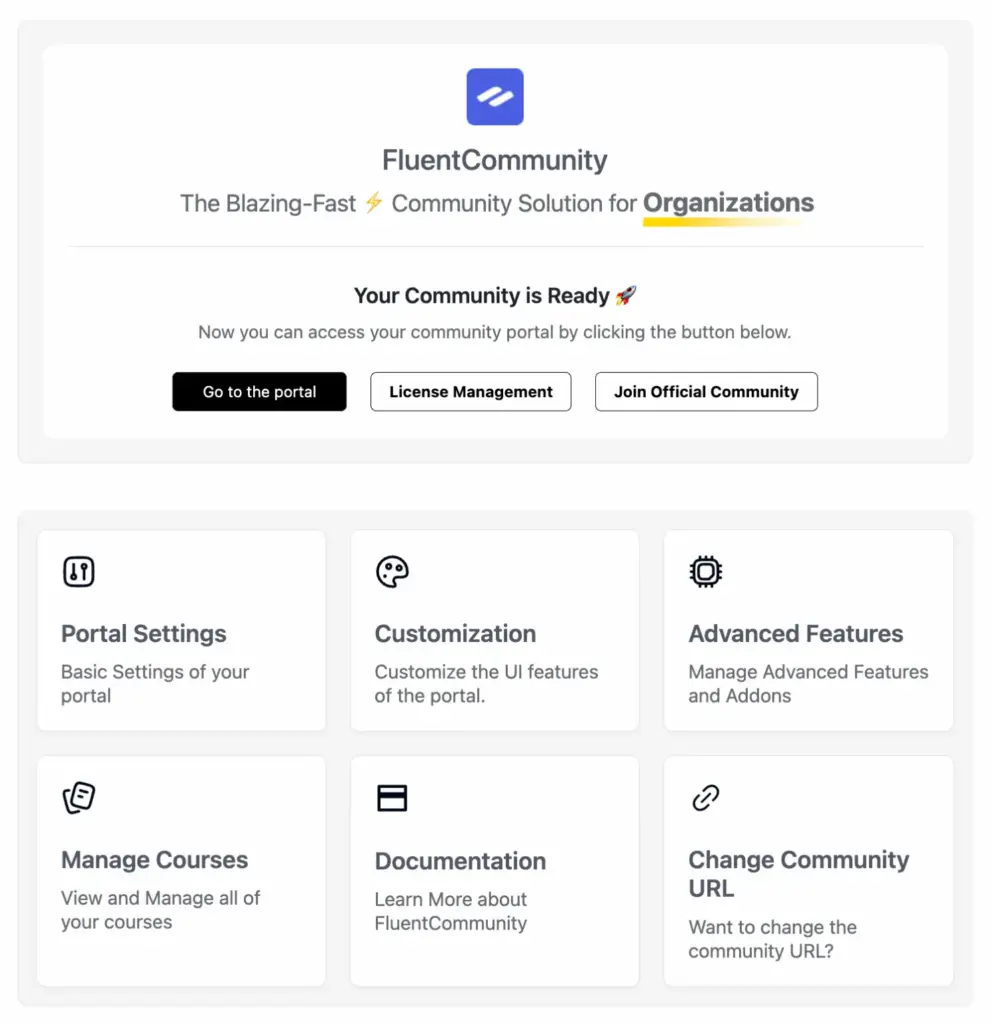
A few other details worth knowing:
- Free version available: You can install FluentCommunity from the WordPress.org repository and run a genuinely usable community with most core features, no credit card required to try it out.
- One-click migration: If you’re already running an older community setup, FluentCommunity offers a one-click import path so you don’t lose your existing members and content.
- Flexible media storage: Store uploads locally, or connect to Amazon S3 or Cloudflare R2 if you want media off your main server entirely.
Key features at a glance:
- Native Gutenberg-based course builder with lessons, modules, and lesson-level discussions
- Unlimited spaces/communities for different groups or topics
- Real-time activity feeds, chat, comments, and reactions
- Leaderboards, polls and surveys, hashtags, and mentions for engagement
- Role manager, user approval, and privacy controls (public, private, secret)
- Dark/light mode and custom branding
- Email digests and real-time notifications
Cons:
- Customization options are still growing.
Pricing: The free version on WordPress.org covers the essentials. The annual pro licenses are priced at $119 for a single site, $239 for up to 5 sites, and $419 for up to 15 sites. For those who prefer a one-time payment, the lifetime licenses are available at $399 for a single site, $799 for 5 sites, and $1599 for 15 sites.
Best for: Creators, coaches, educators, and brands who want one plugin to handle both the social side and the learning side of their platform, without sacrificing site speed.
FluentCommunity is a complete community platform designed for businesses. Download now to create and manage your community.
2. bbPress – the lightweight forum foundation
Sometimes you don’t need a social network. You just need a place where people can ask questions and get answers, organized, searchable, and simple.

bbPress is built by the same team behind WordPress core, which tells you a lot about its philosophy: it does one thing, forums, and does it without bloating your site. It’s the plugin quietly running discussion boards on WordPress.org itself, so it’s proven at scale.
There’s no learning curve here. Install it, and you get threaded discussions, user roles, and moderation tools that feel native to WordPress because, in many ways, they are. It pairs especially well if you already have a course delivery method in place and just need a dedicated Q&A space bolted onto it.
Key features:
- Threaded discussion forums with nested replies
- User role management and moderation tools
- Akismet integration for spam protection
- Lightweight, fast-loading codebase
- Multisite support for networked WordPress installs
- A large pool of third-party extensions for added functionality
Cons:
- The default design is plain, and you’ll likely want at least one extension to make it feel modern.
- It also doesn’t include any native course or LMS functionality, so you’d be pairing it with something else for the learning side.
Pricing: Completely free from the WordPress.org repository. Some third-party extensions carry their own cost.
Best for: Site owners who want a no-frills, fast, and free discussion forum without needing a full social-network feature set.
3. wpForo – the modern forum with flexible layouts
wpForo takes the forum concept and gives it a more contemporary spin. Instead of one rigid format, it offers multiple forum layouts, classic, Q&A-style, and a minimalist option, so you can match the structure to how your audience actually wants to interact.
It’s a genuinely free plugin at its core, with add-ons available if you want to extend specific functionality later. The drag-and-drop forum management makes reorganizing categories and boards painless, and built-in SEO tools mean your discussions have a real shot at ranking in search results, turning old threads into a slow-burning source of organic traffic.
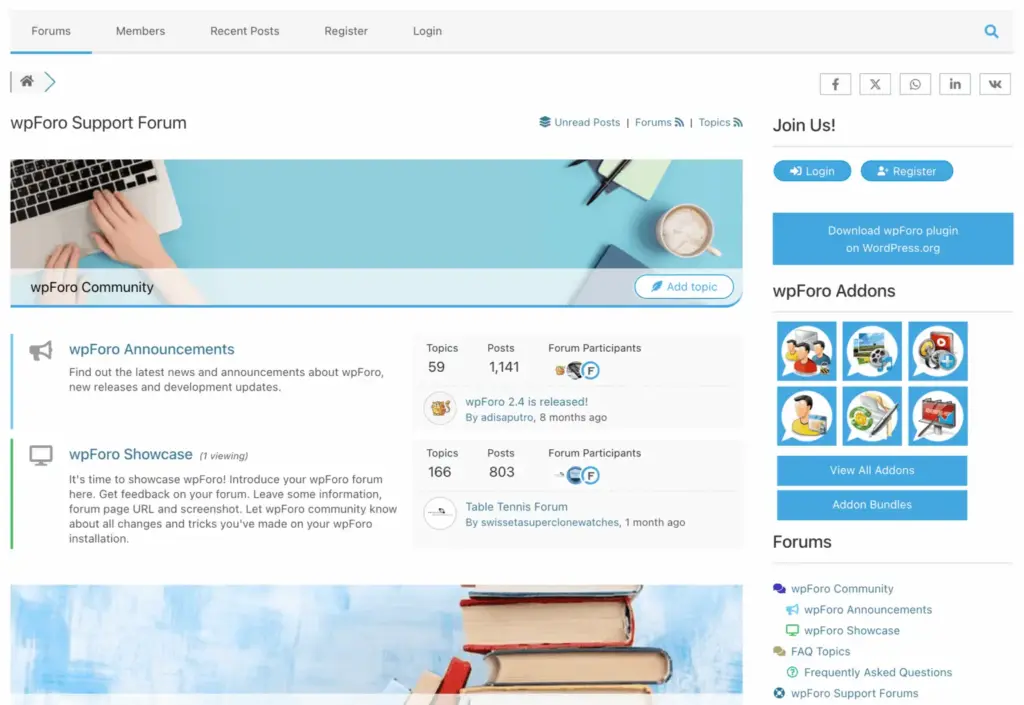
Migration is another strong point. If you’re moving from an older or clunkier forum setup, wpForo supports imports from several other platforms, which removes a major barrier to switching.
Key features:
- Four forum layout styles (classic, Q&A, threaded, minimalistic)
- Drag-and-drop forum and category management
- Multi-language support
- Built-in SEO tools (permalinks, metadata, Open Graph tags)
- Member ratings and badges
- Topic bookmarking and detailed member profiles
Cons:
- It’s forum-first with no native course-building tools, so you’ll need a separate LMS if learning content is part of your plan.
- Some advanced features also require paid add-ons.
Pricing: Free core plugin. Add-ons range from roughly $39/year for a single site up to around $190/year for larger multi-site bundles.
Best for: Communities that want a more flexible, modern-feeling forum experience with strong SEO potential, layered on top of an existing course setup.
4. Asgaros Forum – the simplest way to start
Not every community needs bells and whistles on day one. Sometimes the smartest move is starting small, and Asgaros Forum is built exactly for that.
Asgaros Forum is a lightweight, genuinely free plugin (no premium upsell hiding behind it) that creates a clean, functional discussion board in minutes. Forum pages are created automatically, so there’s no fiddling with shortcodes or page builders just to get a board live.
You still get the essentials, user profiles, polls, guest posting, and moderation tools, without any of the performance overhead of heavier platforms. Its simplicity and automatic forum page creation set it apart from heavier plugins.
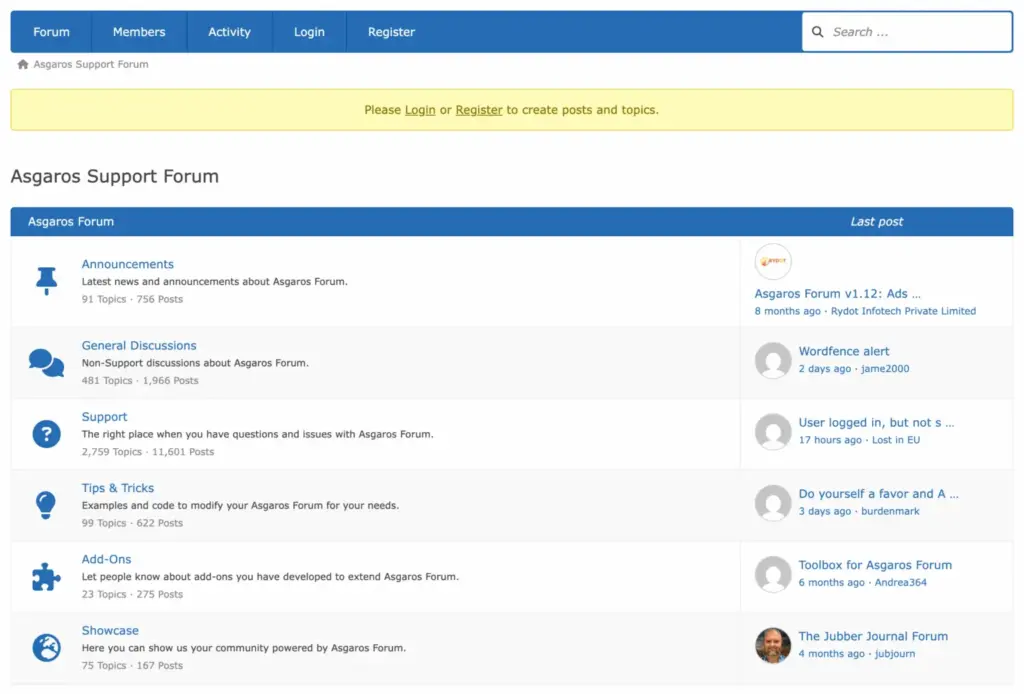
It’s a sensible starting point if you’re testing whether a community is even something your audience wants before you invest in a more feature-rich, course-integrated plugin like FluentCommunity down the line.
Key features:
- Automatic forum page creation
- User profiles and member lists
- Polls and guest posting options
- Customizable fonts and colors
- Built-in moderation tools
Cons:
- No premium version for advanced features.
- There’s no course or LMS functionality at all.
Pricing: Completely free, with optional donations to support ongoing development.
Best for: Small communities or anyone who wants to test the waters with a simple, no-cost forum before scaling up.
5. Ultimate Member — the membership and profile specialist
Sometimes what you actually need isn’t a forum or a course platform; it’s a way to let people register, build out a real profile, and access gated content based on who they are. That’s the gap Ultimate Member fills.
Ultimate Member is a membership-focused plugin at heart, built around customizable user profiles and frontend registration forms rather than activity feeds or discussion threads.
You can restrict content by login status or membership level, build custom registration and login forms without touching code, and give members a profile page that feels more like a personal space than a generic WordPress account page.
Where it earns its spot on this list is flexibility through integrations. It connects with WooCommerce and Stripe to handle payments, Mailchimp to sync new members to your email list, and Google reCAPTCHA to keep spam registrations out.

It also pairs with dedicated forum and job-board tools from the same family of plugins if you want to expand beyond profiles and gating.
Like several others on this list, it doesn’t include any native course-building tools. If learning content is part of your plan, you’ll be integrating it with a separate LMS rather than building courses inside Ultimate Member itself.
Key features:
- Multiple custom registration and login forms
- Customizable user profiles with photos and custom fields
- Content restriction based on login status or membership level
- Built-in spam protection with honeypot fields
- Welcome emails for new members
- Integrations with Mailchimp, WooCommerce, and Stripe
Cons:
- No native course or LMS functionality, so you’ll need a separate plugin for learning content.
- Premium features and integrations can also get pricier as your site grows.
Pricing: A free core plugin is available on WordPress.org. The paid annual plans start at $276/year for a single-site license, with a 2-site license running $348/year and including additional integrations.
Best for: Site owners whose main need is gated content and rich member profiles, rather than community discussions or course delivery.
Which one should you actually pick?
If you want the all-in-one version, start with FluentCommunity. It’s the only plugin on this list that genuinely merges community and course delivery into one fast, well-designed experience, instead of asking you to wire two separate plugins together and hope they play nicely.
The other four are excellent if you’ve already settled on a different course delivery method and just need a dedicated discussion space bolted on. In that case, bbPress and Asgaros Forum are the easiest free starting points, and wpForo strikes a nice balance of modern design and SEO-friendliness.
But if you’re starting from scratch and want one plugin that handles members, conversations, and course delivery without the usual plugin-stacking headache, FluentCommunity is the clear starting point. Install it, set up your first space, and start turning passive visitors into an actual community.
You can join our community to get updates about our products and participate in conversations.



Read Similar Blogs
We build lasting partnerships to boost and manage revenue growth



Leave a Reply