

How to Make Affiliate Links Nofollow in WordPress?


You publish a “best air fryers” review. Ten product images, ten buy buttons, and a comparison table. Every one of them points to Amazon with your tracking ID.
Six months later, you have 80 posts like it. That’s a few thousand affiliate links on your site.
How many of them are marked as paid links?
Most affiliates can’t answer that. Google can. It reads an untagged affiliate link as a paid link passing ranking credit, and that breaks its spam policies. Fixing links one by one doesn’t scale past your first dozen posts.
In this guide, I’ll walk you through what nofollow affiliate links are, whether Google now wants rel=”sponsored” instead, what happens if you skip the tag, and how to set nofollow once for every product display with AzonPress.
Let’s get into it.
TL;DR
What is a nofollow affiliate link?
A nofollow affiliate link is an affiliate link with rel=”nofollow” in its HTML. The attribute tells search engines not to pass ranking credit (link equity) to the page you link to. Readers see no difference, and your commission still tracks.
Here’s a normal affiliate link in HTML:
<a href=”https://www.example.com/product?tag=yourid-20″>Check the price</a>
And here’s the same link marked for search engines:
<a href=”https://www.example.com/product?tag=yourid-20″ rel=”sponsored nofollow”>Check the price</a>
The only change is the rel attribute. Your Amazon tracking ID stays in the URL, so the network still credits the sale to you.
A link with no rel value is often called a “dofollow” link. There’s no such HTML attribute. The term just means the link passes credit by default.
Nofollow vs sponsored vs ugc: which should affiliate links use?
Affiliate links should use rel=” sponsored”, which is Google’s preferred value. rel=”nofollow” is still accepted, so old links can stay as they are.
Until 2019, nofollow was the only option. Then Google added two more values so site owners could say why a link shouldn’t pass credit:
| Attribute | Use it for | Right for affiliate links? |
| rel=”sponsored” | Ads, paid placements, sponsorships and affiliate links | Yes, Google’s preferred choice |
| rel=”nofollow” | Any link you don’t want to vouch for | Yes, still accepted |
| rel=”ugc” | Links in comments, forum posts, and other user content | No |
You can combine values. rel=” sponsored nofollow” is valid HTML and a common choice. Google reads the sponsored signal, and search engines that only know nofollow still get the message.
Which links need what:
- New affiliate links: sponsored, or sponsored plus nofollow.
- Old links already set to nofollow: leave them. Google has said they don’t need changing.
- Links with no rel value: fix these first.
Since 2019, Google treats all three values as hints rather than strict rules. For affiliates, nothing changes. The tag shows you aren’t selling ranking credit, and it does that either way.
Should affiliate links be nofollow?
Yes. Every affiliate link should carry sponsored, nofollow, or both. Leaving them untagged gains you nothing in rankings and puts the whole site at risk.
Google’s spam policies count paid links that pass PageRank as a link scheme. An affiliate link earns you money when someone buys, so Google sees it as a paid link. In its 2021 link spam update, Google warned that sites that don’t tag these links may face algorithmic or manual action.
Here’s what that can mean for an affiliate site:
- Your outbound links get ignored. The mildest result, and you may never notice it.
- A manual action in Search Console. Usually saved for large, obvious patterns, but slow to recover from once it lands.
- Lower trust on thin pages. A review site with hundreds of untagged links to one store starts to look like a link seller.
Does nofollow affect affiliate tracking or commissions?
No. Only search engines read the rel attribute. Your affiliate ID sits in the URL or the network’s redirect, and that’s what affiliate link tracking depends on. Clicks, cookie duration and commissions work the same with or without nofollow.
New affiliates ask this more than anything else, so here it is plainly: tagging a link won’t cost you a sale.
Do affiliate links hurt SEO?
No, not when they’re tagged and sit on pages with real value. Affiliate sites rank every day. Problems start when the links are the only thing a page offers.
Three things decide how affiliate links affect your SEO:
- Tagging. Sponsored or nofollow on every outbound affiliate link. This is the easy part.
- Page value. A table that helps readers compare Amazon products on specs you’ve checked earns trust. A copied product description with a buy button doesn’t. Google’s guidance on thin affiliate pages targets exactly that.
- Disclosure. Tell readers you earn a commission near the top of the page. The FTC requires it in the US, and it’s part of the Amazon affiliate program requirements. It’s separate from the rel tag.
People often mix up two things here. Nofollow on your outbound affiliate links has nothing to do with the backlinks pointing to your site. Tagging your affiliate links won’t lower your own authority. It only stops you from passing credit you were paid to give.
Get access to our exclusive offers and pro tips!
How to set nofollow affiliate links in WordPress with AzonPress
AzonPress adds nofollow to its product displays by default. You set it once in the settings instead of tagging each link.
That matters because affiliate links rarely live in one place. They sit in product images, Buy on Amazon buttons, product tables, and bestseller lists. Tagging each one by hand is where most sites slip.
If you display affiliate products on WordPress through AzonPress, one setting covers those displays.
Here’s how to check it, change it, and confirm it on a live page.
Step 1: Open Appearance Settings
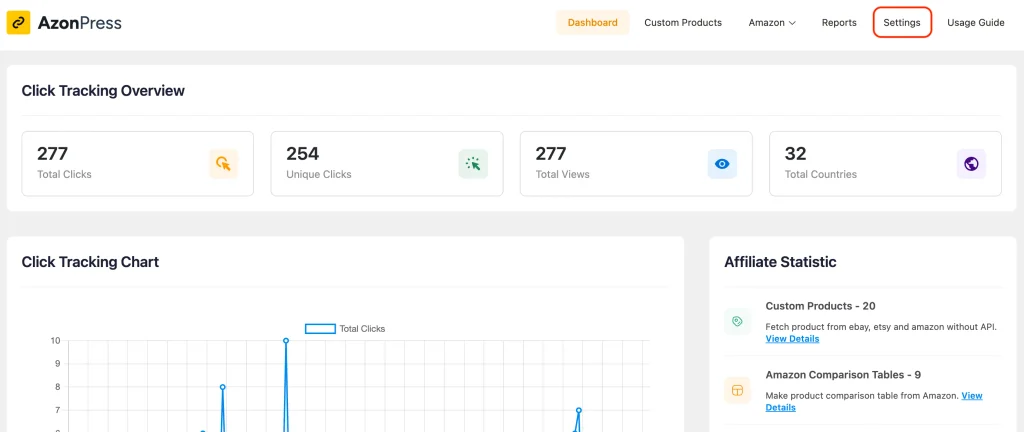
In your WordPress dashboard, go to AzonPress → Settings.
Step 2: Turn on No Follow (and New Window)
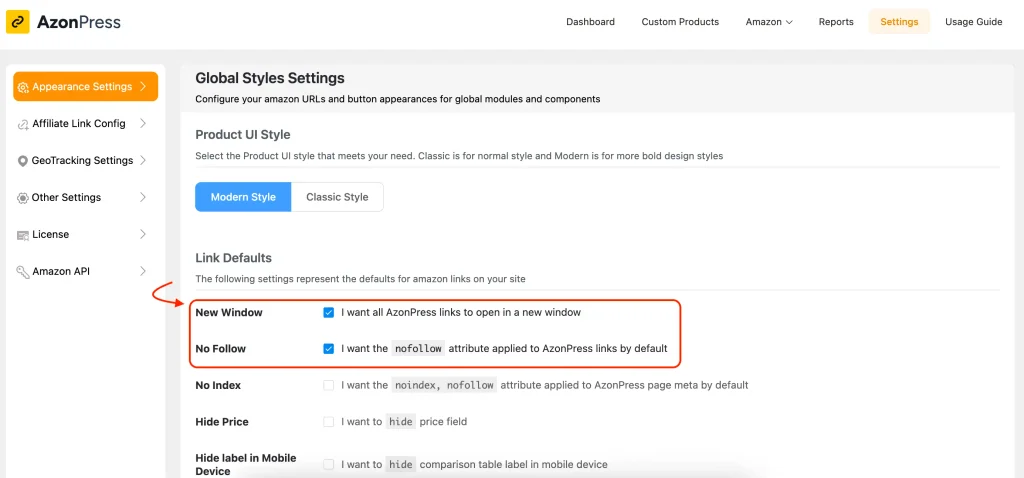
Find the No Follow option and tick it to apply nofollow to your AzonPress links. It’s on by default, so on a fresh install you’ll usually just be confirming it.
While you’re there, check New Window. Ticking it opens affiliate links in a new browser tab, so readers keep your page open while they check a price.
Click Update Settings. AzonPress now applies these link settings to its product displays across your site, including posts you published before.
Step 3: Confirm it on the live page
Check the output yourself. Open a published post with an AzonPress product box, right-click the buy button, and choose Inspect. You should see rel=”nofollow” in the anchor tag.
That’s the setup. One setting, saved once, and your AzonPress product displays stay tagged however many posts you publish.
Manage links, create product tables, and comparison tables, and increase your affiliate revenue
Common nofollow mistakes affiliates make
Tagging internal links. Nofollow belongs on outbound affiliate links only. On links between your own posts, it stops credit from moving around your site and makes good pages harder for Google to find.
Tagging the text link but missing the image. A product image that links to the store is an affiliate link too. So is the buy button, and every link inside a comparison table. Check every clickable element.
Treating cloaking as a replacement for nofollow. A cloaked link like yoursite.com/go/product looks internal, but it redirects to an affiliate URL. It still needs sponsored or nofollow. Affiliate link cloaking makes links tidier and easier to update. It tells Google nothing about payment.
Confusing nofollow with disclosure. Search engines read the rel tag. Readers never see it. You still need a visible affiliate disclosure on the page.
Forgetting old posts. Most sites fix new content and leave years of older reviews alone. Those older posts often hold the most links. A site-wide setting fixes them in one go.
Keep every affiliate link tagged from day one
If you already use AzonPress, open Appearance Settings and confirm No Follow is ticked. Then inspect one live product box to see the tag in place.
If you’re starting a new affiliate site, tag links as sponsored or nofollow from your first post. It’s much easier than going back through 80 reviews later.
If you have older posts with links you added by hand, fix those next. Start with your highest-traffic pages, where most of your affiliate clicks happen.
Once the tag is sorted, you can put your time into what earns: reviews and comparisons readers trust.
I hope this guide makes nofollow affiliate links easier to handle. If you have questions, leave a comment. I’m always happy to help.
Thanks for reading!


Frequently Asked Question



Read Similar Blogs
We build lasting partnerships to boost and manage revenue growth



Leave a Reply