

AzonPress 2.3.2: Product Collections, Click Stats, Faster Admin & More!


Your best products rarely live on just one page. The same ebook, printed planner, or best-selling gadget shows up on your shop page, in launch posts, and at the end of tutorials. Until now, each of those placements needed its own setup and its own updates. You also had no clear way to see which one people actually clicked.
In this release, we focused on making those placements easier to manage and easier to measure.
AzonPress 2.3.2 is now available. It brings Product Collections for your digital and physical products, click stats by page and by product, and a lighter admin. It also includes an important fix for cloaked links.
We recommend updating soon, especially if you use cloaked links. Once you’ve updated, build your first collection and watch where the clicks come from.
What’s included in AzonPress 2.3.2
Build your product showcase once and show it anywhere
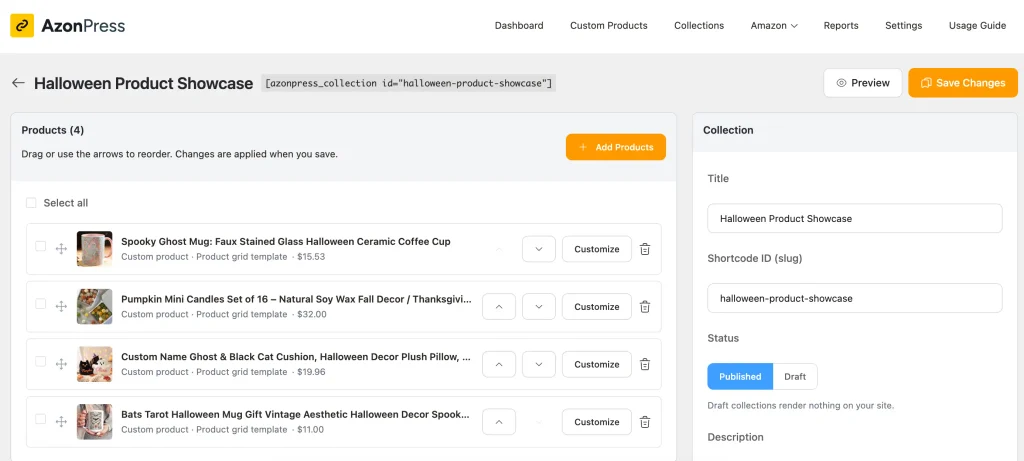
A product collection can hold your Custom Products and Amazon products side by side. Custom Products link to any URL, so each product in a collection can send visitors to your own checkout or download page, to an external selling platform, or to an affiliate link when you recommend someone else’s product.
If you run an affiliate site, the same collection lets you mix Amazon picks with products from eBay, Etsy, or any other program you promote.
Grid, list, or table from one shortcode or block
Each collection works with the new shortcode and a matching Gutenberg block, so you can add it from the block editor, the classic editor, or any page builder that runs WordPress shortcodes.
Both offer grid, list, and table layouts, which means the same collection can appear as a visual grid on a dedicated showcase page and as a compact list at the end of a blog post, without being built twice.
Reorder products without dragging
Every product in the collection editor now has Move up and Move down buttons. Small changes to the order take one click per step, and you can arrange an entire collection using only the keyboard, which also makes collections easier to manage for anyone who does not use a mouse.
An illustrative example: Say you sell planner templates and a companion ebook. You create a “Planner Starter Kit” collection with three templates and the ebook, then show it as a grid on your shop page and as a list at the end of your weekly planning post. When you release a fourth template, you add it to the collection once, and both pages show it.
An affiliate site works the same way, with a “Home Office Setup” collection of two Amazon desks and an Etsy cable organiser shown as a grid in a buying guide and as a table in a desk review.
See which pages and products get the clicks
Knowing that a product got clicks is useful, but knowing where those clicks came from is what tells you where to place your products next and which pages deserve more of your attention.
Click stats inside the collection editor
The collection editor now shows click stats right where you manage the collection, broken down by page and by product. You can see which pages get the most out of a collection, move the products that get clicks higher in the list, and rethink the title, image or description of the ones visitors keep passing over.
Collection and page attribution in Reports
Click analytics now records which collection and which page each click came from. Instead of only seeing totals, you can trace a click back to where it happened and compare how the same product does in different placements, such as a grid on your shop page versus a list at the end of a tutorial. Click stats measure interest rather than purchases, because Reports count clicks on your AzonPress links and do not record sales, conversions or commission.
A full year of click history on new sites
New installs now keep analytics data for 365 days by default, which gives you a full year of click history for spotting trends, comparing seasons, and seeing how a launch held up months later. If you already use AzonPress, your current retention setting stays as it is.
Amazon product tables that refresh in full
Product tables, which you will find under Amazon Products in the WordPress sidebar, show Amazon products, and large tables could previously end up only partly refreshed. Refreshing a product table now updates every product in it, working through them in batches of 50 so each step stays light on your server. When the refresh finishes, AzonPress tells you how many products were skipped, so you know straight away whether anything in the table needs a second look.
Geo-targeting for Amazon links on cached pages
If you show Amazon products and use geo-targeting, this change is for you. When your site uses a caching plugin or a CDN, the page a visitor sees is often a saved copy rather than a freshly built one, and that should not decide which Amazon store they land on. Geo-targeted links now work correctly on cached pages, so international visitors still reach their own country’s Amazon store while you keep page caching switched on for speed.
A faster, lighter admin
The admin product list now loads one page at a time instead of loading every product at once, so sites with large catalogs get a quicker screen and use less memory in the browser and on the server.
We also reworked the click limiter, cloaked-link checks, and background keyword refresh so they take less server time. These tasks run behind the scenes, so the benefit shows up as a lighter load on your site overall, which matters most on shared and budget hosting.
Fixes
The most important fix in this release concerns cloaked links. Some cloaked links lost the affiliate tag during the redirect, which meant those clicks could reach their destination without your tag attached. Cloaked links now keep your tag on every redirect, and this is the main reason we recommend updating soon.
Other fixes in 2.3.2:
- “old_price” warning: Custom products without a price no longer trigger an
Undefined array key "old_price"PHP warning, so your error logs stay clean, and the warning no longer appears on sites with debug output turned on. - Analytics chart dates: The analytics chart now shows the correct days, and the Last Week filter covers the correct date range.
- Product table titles: Renaming a product table now saves the new title.
- Product table custom CSS: Custom CSS added to a product table now saves and applies as expected.
Complete changelog
Added
- Product collections that group custom and Amazon products into one reusable list
Shortcode and Gutenberg block with grid, list, and table layouts- Move up and Move down buttons to reorder collection products by keyboard
- Collection click stats by page and by product in the collection editor
- Collection and page attribution in click analytics
Improved
- Product table refresh now covers every product, in batches of 50, and reports how many were skipped
- Admin product list loads one page at a time
- Geo-targeted links work on cached pages
- New installs keep analytics for 365 days by default
- Click limiter, cloaked-link checks and background keyword refresh use less server time
Fixed
- Undefined array key “old_price” warning on custom products without a price
- Analytics chart days and Last Week range
- Affiliate tag dropped from cloaked links
- Product table title edits not saving
- Product table custom CSS not saving
Update to AzonPress 2.3.2
AzonPress 2.3.2 gives the products you most want people to find one saved place to live and shows you which pages and products are getting the clicks, while the cloaked-link fix makes sure those clicks arrive with your tag attached. We recommend updating from your WordPress dashboard right away.
Once you have updated, build your first collection from the products you most want people to find, place it on two or three pages, and check its click stats after a week. If you have questions or run into anything unexpected, our support team is happy to help, and we would love to hear how you are using collections on your site.
New to AzonPress?
It’s a WordPress plugin for showcasing digital and physical products and sending visitors to your checkout, product, or download pages.





Read Similar Blogs
We build lasting partnerships to boost and manage revenue growth




Leave a Reply