


Geo-Targeting in Affiliate Marketing: What It Is and How It Works


You wrote a great product review. Someone from the UK found it, clicked your Amazon link, and landed on amazon.com, where they saw prices in USD, international shipping costs, and a checkout experience built for US buyers.
They left without buying. You got no commission.
That click wasn’t wasted because your content was bad. It was wasted because your affiliate link sent them to the wrong store.
This is what geo-targeting fixes.
If you’re running an Amazon affiliate site on WordPress, it’s one of the highest-impact changes you can make, especially if any portion of your traffic comes from outside the US.
This guide covers geo-targeting in affiliate marketing, why it matters for affiliate commissions specifically, and how to set it up on your WordPress site.
TL;DR
- Geo-targeting routes each visitor to their local Amazon storefront automatically, so you stop losing commissions from international traffic that was already clicking your links.
- Most affiliate sites get 15–30% of traffic from outside the US, and without geo-targeting, none of those clicks earn anything
- Amazon runs separate affiliate programs per country; your US tag doesn’t apply to UK or Canadian sales
- The five storefronts worth setting up first: US, UK, Canada, Australia, and Germany
- You need a separate Amazon Associates account for each country before geo-targeting can earn you anything from that region
- AzonPress has geo-targeting built in, no third-party tool or extra subscription needed
- Country-wise targeting lets you manually control which store each country’s traffic routes to, with the correct affiliate tag attached
- Geo-targeting is a one-time setup that keeps paying off on every international click going forward
What is Geo-targeting in affiliate marketing?
Geo-targeting in affiliate marketing is the practice of automatically redirecting visitors to the most relevant version of a store or offer based on their geographic location.
For Amazon affiliates, that means: a visitor from Germany clicks your affiliate link and lands on amazon.de instead of amazon.com. A Canadian visitor lands on amazon.ca. A UK visitor lands on amazon.co.uk. Each one sees local prices, local currency, local shipping, and your affiliate tag for that region is attached to the link.
Without geo-targeting, every one of those visitors hits your default storefront (usually amazon.com), and any purchase they make there earns you nothing because your Amazon.com affiliate tag doesn’t carry over to a different Amazon marketplace.
It’s not a fringe problem. Most English-language affiliate blogs receive 15–30% of their traffic from outside the US. For a site pulling 10,000 monthly visitors, that’s potentially 1,500–3,000 clicks every month that generate zero commission.
What do you need before you set up geo-targeting?
Before touching your WordPress dashboard, get these in order:
- An Amazon Associates account for each target country: You need to sign up for each regional program separately. Your US Associates account doesn’t cover UK sales; they’re completely independent. Sign up at each country’s Amazon Associates portal.
- Your affiliate tracking ID for each region: Once approved, each program gives you a tracking ID (also called a Store ID or Associates tag). It’ll look something like yourbrand-uk-21 for the UK program. Keep these somewhere accessible; you’ll need them during setup.
- AzonPress installed on your WordPress site: The geo-targeting feature is built into AzonPress (an affiliate marketing plugin for WordPress), no third-party service, no extra plugin needed.
If you haven’t set up your Amazon Associates tracking IDs yet, see our guide: What is Amazon Affiliate Tracking ID? How to Create Them
Get access to our exclusive offers and pro tips!
How to set up geo-targeting with AzonPress?
AzonPress has geo-targeting built directly into the plugin. Here’s how to configure it.
Step 1: Install and activate AzonPress
AzonPress is a premium affiliate marketing plugin, so the first step is to purchase the plugin.
After completing your purchase, you’ll get access to the WPManageNinja Dashboard. Log in with your account credentials, and under the My Products section, you’ll find AzonPress if you’ve already purchased it.
- Now download the ZIP file.
- Then go to your WordPress dashboard > Plugins > Add New> Upload plugin.
- Choose the ZIP file, click Install Now, and activate the plugin once it’s installed.
Step 2: Connect your Amazon PA API credentials
For geo-targeting to route links correctly, AzonPress needs to be connected to Amazon’s Product Advertising API.
Go to AzonPress → Settings → Amazon API and enter your PA API Access Key, Secret Key, and primary Associate tag.
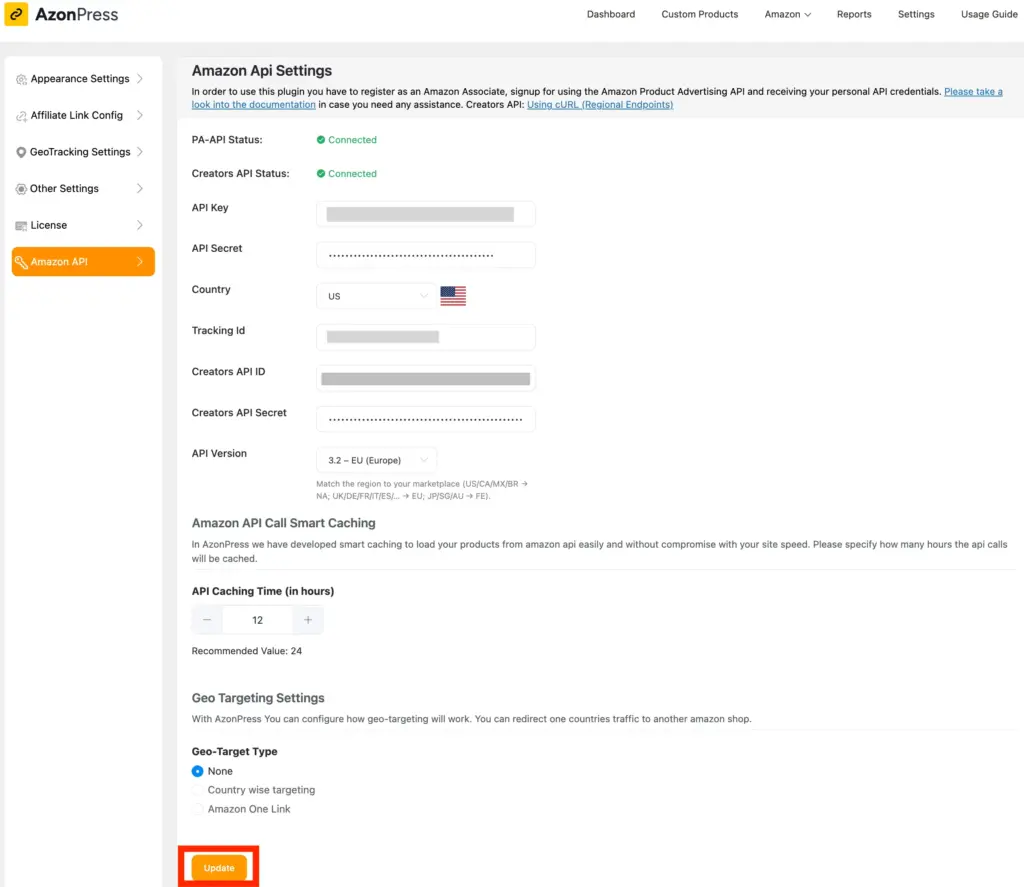
Then scroll down below. Here you’ll get the Geo Targeting settings option.
From the Geo-target type, select country-wise targeting. This is powerful because it ensures your visitors are redirected to the right store.
Then select which store you want them to shop. Next, enter the tracking ID (got from your Amazon associate account) and choose the targeted countries where visitors will be redirected.
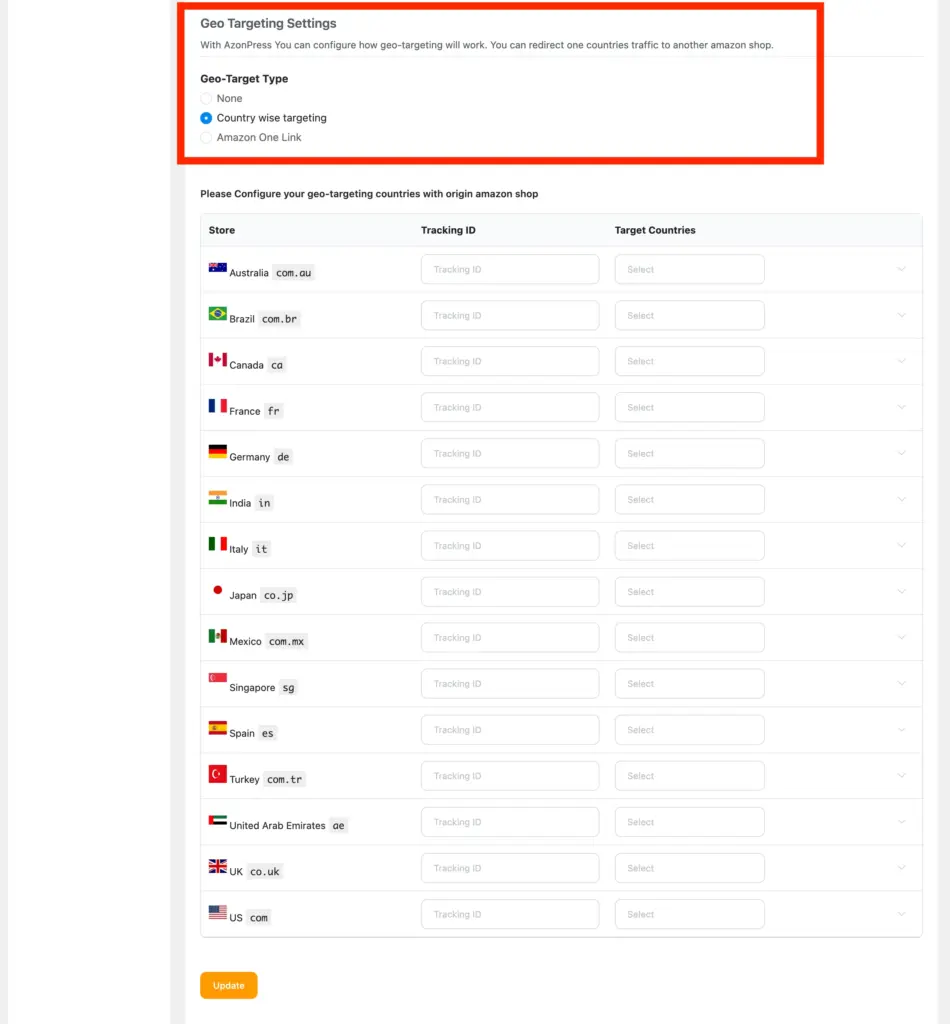
If you haven’t set this up yet, check out the Amazon Creators API setup guide for details.
Step 3: Navigate to the geo-targeting settings
In your WordPress dashboard, go to AzonPress → Settings → Geo-Targeting.
Now, here you have to provide the MaxMind API Key to enable your GEO Tracking/Targeting.
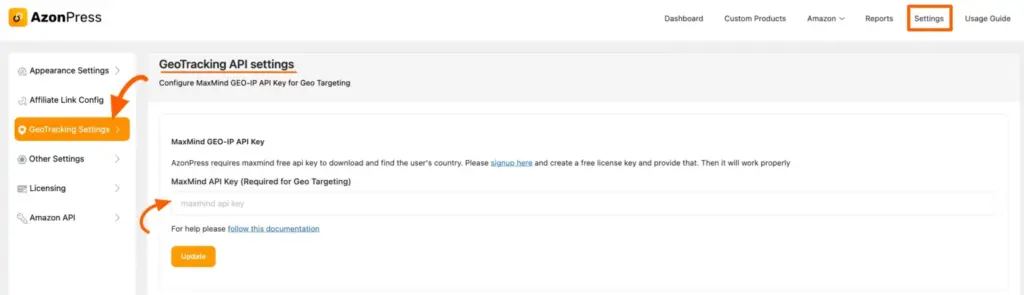
To get the MaxMind ID, first log in to your Maxmind account or sign up here for free.
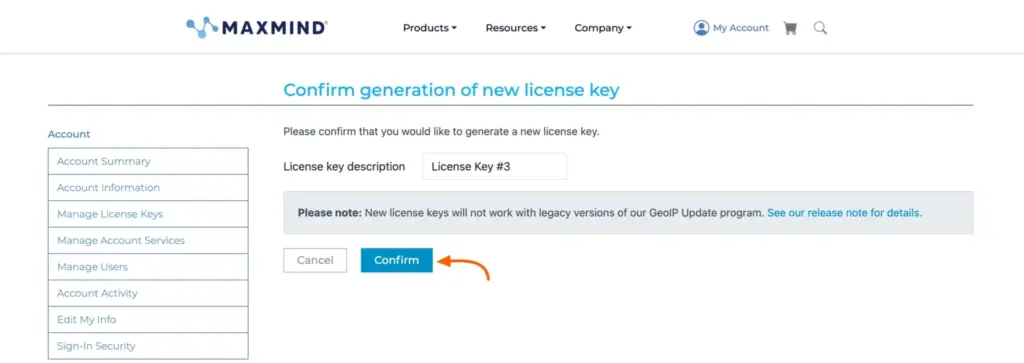
After logging into the MaxMind account, go to Manage Licence Key from the left sidebar, and click on the Generate new license Key button.
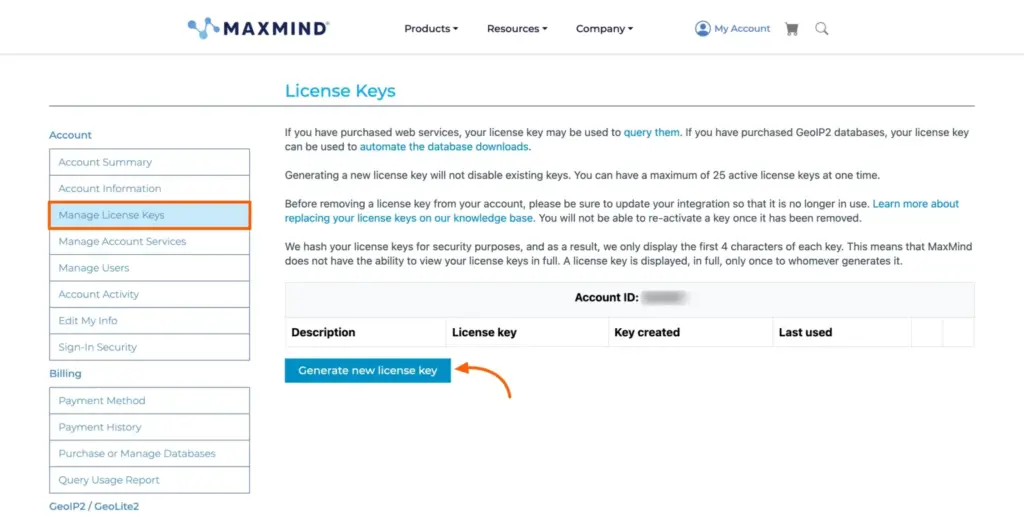
A confirmation page will appear with “Generate New Licence Key”; click the Confirm button here.
Now you will get your MaxMind API key. Copy it from here.
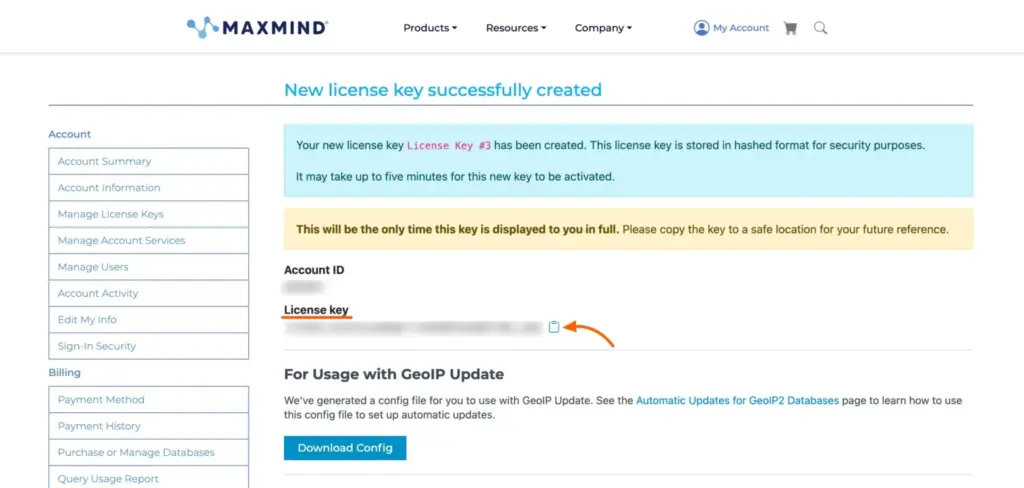
Now, paste the API Key you copied from the MaxMind account into the MaxMind API Key field and click on the Update button.
Now Geo-targeting/tracking will work just fine with AzonPress!
Step 4: Save and test
Save your settings. Then test the setup before you consider it done.
The most reliable way to test: open a private/incognito browser window (this clears any existing geo-targeting cookies from previous sessions), connect to a VPN set to a country you’ve configured (UK, Canada, etc.), and click one of your affiliate links.
You should land on the correct regional Amazon store with the right affiliate tag in the URL.
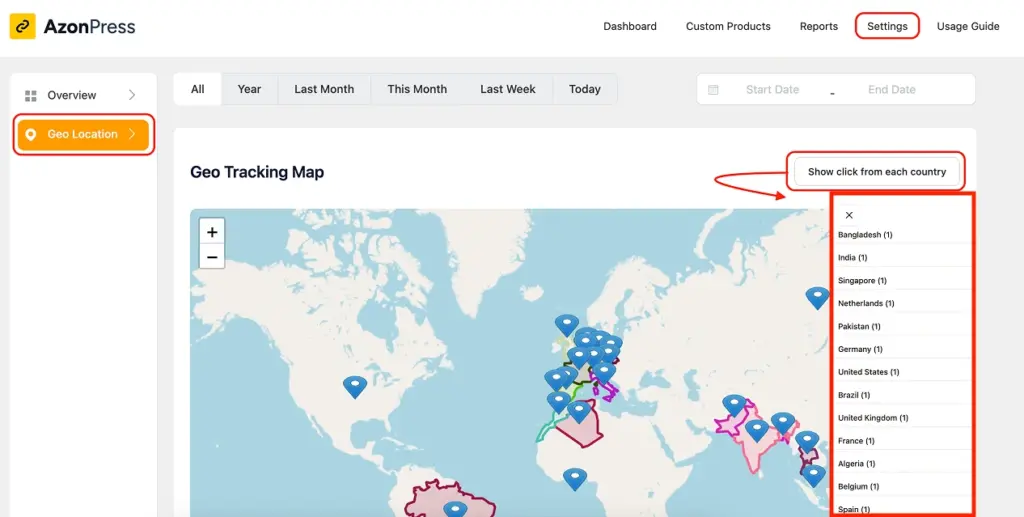
You can also verify through AzonPress’s geolocation feature of the Advanced Report Dashboard, which tracks clicks by country, so you can see whether international visitors are being routed correctly over time.
Common geo-targeting mistakes to avoid
Here are some common geo-targeting mistakes to avoid for affiliate marketing.
Enabling geo-targeting before signing up for regional programs: This is the most common one. If you enable the UK redirect but haven’t enrolled in the Amazon UK Associates program, traffic will route correctly — but you won’t earn anything because there’s no valid UK affiliate tag attached.
Using the wrong tracking ID format: Each Amazon marketplace has its own ID format convention. Double-check that you’re entering the correct tag for each country — a small typo means correctly-routed traffic that still doesn’t earn commission.
Testing while logged into WordPress: Geo-targeting won’t work as expected when you’re logged into your WordPress admin. Always test in a private/incognito window with a VPN.
Skipping the fallback setting: If you leave fallback unset and a product isn’t available in a regional store, visitors hit a dead end. Set the fallback to search; it takes 30 seconds and keeps the traffic recoverable.
Not checking your analytics afterward: Set a reminder to look at your AzonPress report dashboard 2–4 weeks after enabling geo-targeting. The country breakdown will show whether international clicks are converting, and whether there are additional markets worth enrolling in.
Does geo-targeting work beyond Amazon?
One thing worth knowing: AzonPress isn’t limited to Amazon affiliate links.
The plugin supports affiliate products from other platforms eBay, Etsy, and others— through its Custom Product with Zero API feature. You paste the product URL, the plugin fetches the product details, and you can build product tables and comparison tables without Amazon API credentials.
This matters for geo-targeting because not every product niche is best served by Amazon in every country. If you’re promoting products where a regional alternative outperforms Amazon in a specific market, AzonPress gives you the flexibility to route that traffic to a different store entirely.
Start earning from the international clicks
Geo-targeting in affiliate marketing is one of the few affiliate optimizations where the setup effort is small, and the upside is ongoing. You do it once, and every international visitor from that point forward has a shot at converting.
The most time-consuming prerequisite is signing up for each regional Amazon Associates program, but those approvals are generally straightforward, and you only need to do it once per marketplace.
Once your regional accounts are approved and your tracking IDs are in hand, the AzonPress setup takes under 5 minutes.
If you’re already using AzonPress to manage your product and comparison tables, geo-targeting is included; just turn it on.
Not using AzonPress yet?
Try it now. It starts at $3.25/month for a single site, with geo-targeting, comparison tables, link management, and an advanced reporting dashboard all included in every plan.





Read Similar Blogs
We build lasting partnerships to boost and manage revenue growth



Leave a Reply