
How to Post Affiliate Links on Pinterest
If you’ve been using Pinterest mostly to save recipes or home decor ideas, here’s something worth knowing: Pinterest is actually one of the best platforms for affiliate marketing.
People come to Pinterest specifically looking for products and inspiration, which makes it different from most other social platforms. It drives real buying decisions.
But posting affiliate links on Pinterest the wrong way can get your account suspended or flagged as spam. A lot of beginners don’t know where the line is, and they either avoid affiliate links out of fear or use them in ways that backfire.
This guide covers everything: whether affiliate links are allowed on Pinterest, the different ways to add them, how to post affiliate links on Pinterest step-by-step, and the mistakes you really want to avoid.
Can you post affiliate links on Pinterest?
Before posting any affiliate link, the first thing you might think of is, “Can you post affiliate links on Pinterest? Is it legal? If I am more specific, can you post Amazon affiliate links on Pinterest?”
The answer is “Yes,” you can. You can add your affiliate link directly to your Pin in the destination link field.
Pinterest officially allows affiliate links. If you’re on any reputable affiliate programs such as Amazon Associates, Rakuten, Walmart, Shopstyle, and LTK, you can add affiliate links directly to your pins, and Pinterest won’t automatically remove them.
But there are rules. Pinterest’s spam policy is strict, and they’ve taken action against affiliate links before (they temporarily banned them and lifted that ban in 2016). If you use affiliate links in a way that looks spammy, repetitive, or misleading, your account can get flagged or suspended.
Pinterest’s official stance is that affiliate marketing is fine as long as you’re transparent and actually adding value. The platform wants pins to be helpful and relevant, not just promotional funnels. If you keep that in mind, you’ll stay on the right side of their policies.
Different methods to post affiliate links on Pinterest
When you’re doing Pinterest affiliate marketing, there isn’t just one way you can use affiliate links on Pinterest. Depending on your setup, your audience, and the amount of content you have, some methods will work better than others.
Before you post affiliate links on Pinterest, make sure you have a Pinterest business account. If you’re using a personal one, you can easily turn it into a business account.
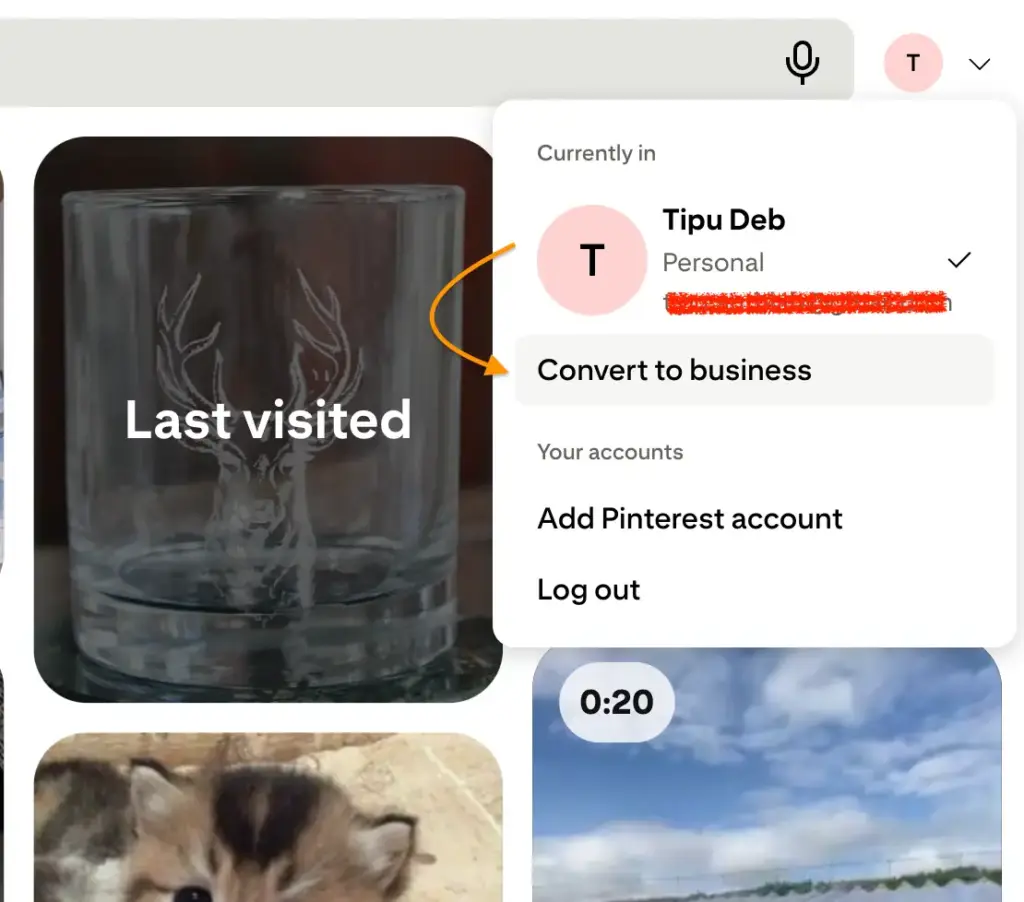
Here’s a breakdown of all the ways you can promote affiliate links on Pinterest.
1. Direct affiliate links in pins
This is the most straightforward approach. When you create a pin, you add your affiliate link as the destination URL. Someone clicks the pin, lands directly on the product page, and if they buy, you earn a commission.
How it works: Create a pin, add a compelling image, write a keyword-rich description, and paste your affiliate link into the URL field.
Pros:
- Simple to set up with no blog or website required
- Fast to implement and easy to scale
- Works well for products with obvious visual appeal
Cons:
- Less context for the buyer since there’s no review or comparison
- Lower conversion rates compared to warm traffic from a blog post
- Harder to build an audience or following this way
- If your affiliate link breaks or the program changes, you have to update every pin manually
This method can generate income, especially with visually strong products, but it works best as one part of a broader strategy rather than your only approach.
2. Drive traffic to a blog (recommended)
This is the approach most serious Pinterest marketers use, and for good reason.
Instead of linking directly to an affiliate product, you link your pin to a blog post you’ve written that contains your affiliate links, product reviews, comparisons, or recommendations.
The reader arrives with context and intent, which dramatically improves conversion rates.
The funnel looks like this: Pinterest pin → Your blog post → Affiliate link → Purchase.
Why this works better:
Your blog post does the selling. A well-written review or how-to guide builds trust in a way that a product page never can. Readers who arrive via Pinterest and read your content are already interested. They’re not just browsing.
You also get SEO benefits. Your blog post can rank in search engines, so you’re building a content asset that drives traffic from multiple sources, not just Pinterest, which makes it a great source of passive income.
It’s also safer. If Pinterest changes its policies around direct affiliate links again, your strategy doesn’t fall apart because your blog is yours.
And it’s scalable. You can create dozens of pins linking to the same blog post, testing different images and descriptions to see what drives the most clicks.
3. Using landing pages or link-in-bio tools
If you don’t have a blog (or don’t want one), you can use link-in-bio tools like Linktree, Stan.store, or Beacons, which let you create a simple page with multiple links.
You point your Pinterest profile to this page, and visitors can choose from your top affiliate picks.
This works particularly well if you’re promoting multiple products across different categories and don’t want to manage a full blog.
When to use this method:
- You’re a content creator without a full blog
- You want to promote several products without creating individual pins for each
- You want to capture email addresses (some of these tools have built-in opt-in features)
The email capture angle is worth considering. Some creators use a simple landing page to offer a freebie in exchange for an email address. That email list becomes a direct channel to promote affiliate products over time, which is far more valuable than any single pin.
4. Add affiliate links in your Pinterest profile
Pinterest lets you add a website link to your profile. You can point this to your blog, your landing page, or a specific affiliate resource page.
This is a small but useful addition. People who enjoy your content often check your profile, and having a relevant link there captures that traffic.
When it works best: If you have a curated resource page or a landing page with multiple affiliate recommendations, your bio link can drive consistent clicks without any extra effort.
Limitations: It’s a single link, so you can’t send people to multiple products at once. This method is best used to drive people to a hub page, mostly your website, that contains your affiliate links, rather than linking directly to a single product.
5. Product tagging (If Available)
Pinterest has a product tagging feature that lets you tag specific products directly within your pin images. When someone taps a tagged product, they see pricing information and a direct link to buy.
How it works: You upload an image, then use the tagging tool to identify products within the image. Pinterest pulls product data (price, availability) from your linked product catalog.
You need a Pinterest business account and an approved merchant account. You’ll also need a product catalog, which typically means you’re selling products through your own store.
For most affiliate marketers, this feature isn’t fully accessible right now since it’s designed primarily for retailers.
But it’s worth knowing about, especially if you’re in a product-heavy niche like fashion, home decor, or kitchen tools. As Pinterest expands its shopping features, this may become more accessible to affiliate publishers in the future.
How to post Amazon affiliate links on Pinterest
Amazon Associates is one of the most popular affiliate programs, and yes, you can use Amazon affiliate links on Pinterest directly. Amazon allows it in its operating agreement, and Pinterest allows it too.
Here’s the step-by-step process of posting Amazon affiliate links on Pinterest:
Step 1: Get your Amazon affiliate link
If you’re an Amazon affiliate marketer, log in to your Amazon Associates account. Find the product you want to promote. Use the “Get Link” button in the Associates dashboard and copy your full affiliate link.
Step 2: Create a pin on Pinterest
Go to Pinterest and click the “+” icon to create a new pin. Upload a high-quality image. This can be a product photo, a lifestyle image, or a custom graphic you’ve created. Clear, bright images with minimal clutter consistently perform best on Pinterest.
You can also post videos instead of images. Use Canva to create visually appealing images or videos with minimal effort.
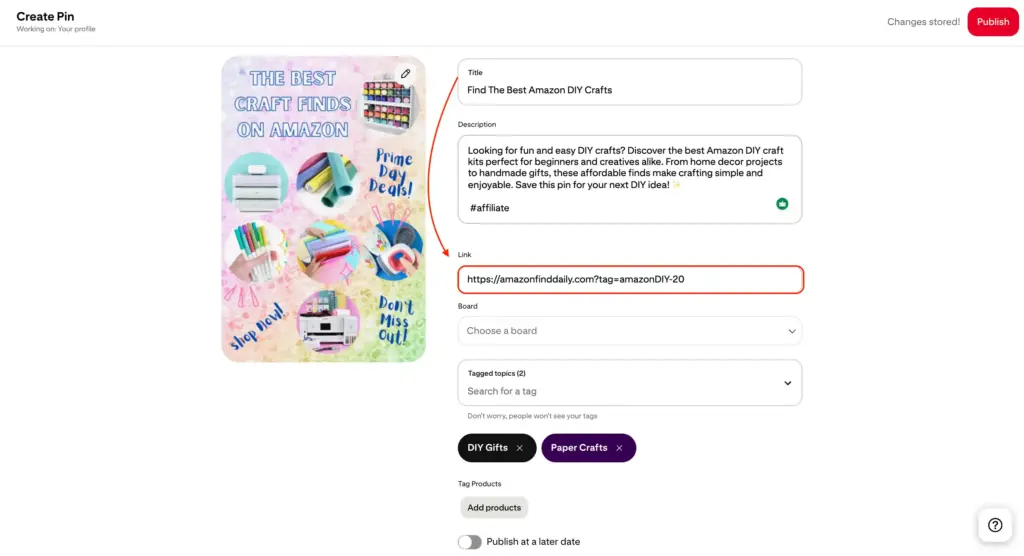
Step 3: Add your destination URL
Paste your Amazon affiliate link into the destination URL field. Ensure the URL starts with https:// and ends with ?tag=yourID. This “tag=yourID” indicates your associate’s store ID and identifies you as a commission earner.
Pinterest will show a preview of where the link goes, which gives you a chance to catch any errors before publishing.
Step 4: Write a keyword-rich title
Your pin title should include keywords people actually search for on Pinterest. Think about what someone would type to find this product. “Best knife set for beginners under $50” beats “Amazing knives you’ll love.” Specific and searchable wins.
Step 5: Write a helpful description
This is where most people underdeliver. Your description should explain why someone would want this product, what problem it solves, and who it’s for. Include your primary keyword naturally. Aim for 100 to 200 words. Don’t just list features. Tell people why it matters.
Step 6: Add your disclosure
At the end of your description, add #ad or #affiliate. This is required by FTC guidelines and Pinterest’s policies. Something like: “This pin contains affiliate links. I may earn a small commission if you purchase through my link, at no extra cost to you. #affiliate”
Step 7: Choose the right board
Pin to a relevant board. A product pin for a coffee maker should go on a coffee or kitchen board. Board relevance affects how Pinterest distributes your pins to the right audience.
Step 8: Publish and monitor
After posting your affiliate links on Pinterest, check your pin’s performance in Pinterest Analytics over the next few weeks.
Look at impressions, outbound clicks, and saves. If a pin isn’t getting traction, try a different image or adjust the description and see if that changes things.
Common mistakes to avoid while posting affiliate links on Pinterest
Posting raw affiliate links with no context: A pin that’s just a product image with an affiliate link and nothing else tells the reader nothing. Why should they click? What makes this product worth buying? Give people a reason to care before asking them to act.
Skipping disclosures: This is a legal requirement, not a suggestion. The FTC can take action against affiliates who don’t disclose. More practically, readers who discover you didn’t disclose will lose trust in you, and that’s much harder to recover from than any fine.
Amazon’s operating agreement requires clear disclosure of your affiliate relationship on every piece of content.
Using low-quality images: Pinterest is a visual platform. A blurry, dark, or poorly composed image will get ignored regardless of how good the product is.
Use high-resolution images, clean backgrounds, and readable text overlays when they add context.
Overposting affiliate links: If every pin you create is promotional, Pinterest’s algorithm will flag your account as spammy. The general recommendation is to keep affiliate or promotional pins to around 20 to 30 percent of your total pinning activity. Mix in helpful, non-promotional content regularly.
Ignoring pin SEO: Pinterest is a search engine. If your pin titles and descriptions don’t include keywords people search for, your pins won’t get found.
Research what people are actually searching for in your niche before creating content.
Using URL shorteners or redirect links: Pinterest doesn’t allow this. Use full, direct URLs only.
Pinning to irrelevant boards: Putting a kitchen product pin on a travel board confuses Pinterest’s algorithm and frustrates people who follow that board for travel content.
Not testing anything: What works in one niche doesn’t always work in another. Test different images, descriptions, and calls to action to learn what actually drives clicks and conversions for your audience.
Get access to our exclusive offers and pro tips!
Legal & compliance checklist
FTC disclosure basics:
- Disclose your affiliate relationship before or alongside the link, not buried somewhere people won’t see it
- Use clear, plain language: “#ad,” “#affiliate,” or “This post contains affiliate links.”
- Make disclosures visible on mobile, where most Pinterest users browse
- Don’t rely on vague terms like “partner” or “in collaboration with” that most users won’t recognize as affiliate disclosures
Pinterest platform compliance:
- Never use shortened or masked URLs when posting affiliate links on Pinterest
- Don’t create large volumes of near-identical pins (some variation is fine, mass duplication is not)
- Don’t keyword-stuff your descriptions in a way that reads unnaturally
- Review Pinterest’s spam policy periodically, especially if you’re scaling up your Pinterest affiliate marketing activity
Building trust with your audience:
- Be honest about the products you promote. If something has real downsides, mention them
- Only promote products you’d actually recommend to a friend
- Respond to comments when people ask questions about products you’ve pinned
- Over time, a reputation for honest recommendations is worth more than any short-term commission you’d earn by overpromising
Conclusion
Pinterest is one of the few major platforms where directly posting affiliate links is allowed and practical, especially if you’re willing to create helpful, visually appealing content.
The audience comes with buying intent built in. They’re already looking for ideas and products, which puts you in a strong position as someone making recommendations.
The approach that tends to work best long-term is the blog-first method: create solid content, link your pins to that content, and let your posts do the selling.
If you’re just getting started, don’t let the options overwhelm you. Create a business account, set up a few boards in your niche, start pinning with real descriptions and proper disclosures, and pay attention to what your audience responds to. The learning curve isn’t as steep as it looks.
FAQs: Posting Affiliate Links on Pinterest
1. Can beginners use affiliate links on Pinterest?
Yes, beginners can absolutely use affiliate links on Pinterest. You don’t need a website to start, although having one is recommended for long-term success.
2. How many affiliate pins can I post daily?
There’s no fixed limit, but quality matters more than quantity. Posting 3–10 high-quality pins per day is a safe range.
3. Does Pinterest ban affiliate links?
No, Pinterest does not ban affiliate links. However, it may block or limit certain links if they appear spammy or violate policies.
4. Do I need a blog to use affiliate links on Pinterest?
No, it’s not mandatory. You can add affiliate links directly to pins. However, using a blog as a middle step helps build trust, improve conversions, and give you more control over your content.
5. Do I need to disclose affiliate links on Pinterest?
Yes, disclosure is required. You should clearly mention terms like “#ad”, “#affiliate”, or “This post contains affiliate links” in your pin description.
6. Can I post Amazon affiliate links on Pinterest directly?
Yes, you can use Amazon affiliate links directly on Pinterest. However, you must follow Amazon’s rules, including proper disclosures and avoiding cloaked or shortened links.
7. Can I use link shorteners for affiliate links?
It’s not recommended. Platforms like Pinterest prefer transparent URLs, and some affiliate programs (like Amazon) may prohibit link cloaking. Always use your original affiliate link.
8. Can I promote multiple affiliate products on one pin?
It’s better to focus on one product per pin for clarity and higher conversions. If you want to promote multiple products, use a blog post or a landing page instead.
9. Can I reuse the same affiliate link in multiple pins?
Yes, but avoid posting identical pins. Create multiple designs, titles, and descriptions for the same link to reach different audiences and avoid being flagged as spam.





Read Similar Blogs
We build lasting partnerships to boost and manage revenue growth


Leave a Reply