

How to Compare Amazon Products & Earn More Affiliate Commissions


You put real effort into your affiliate blog. You research products, write honest reviews, build up traffic. And then your commission dashboard barely moves.
That is not always a traffic problem. Most of the time, it is a content format problem.
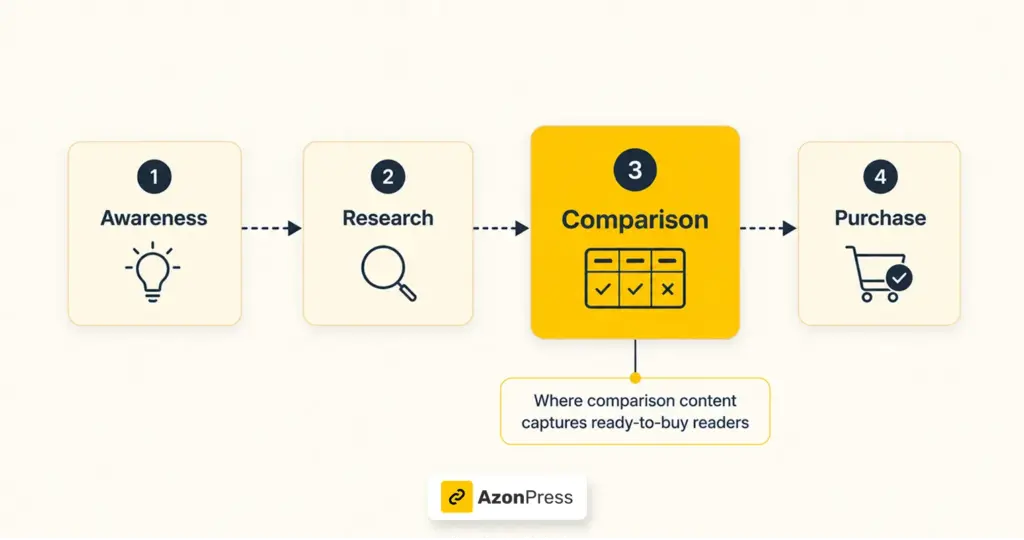
A product review tells your reader whether something is worth buying. A product comparison tells them which one to buy. Those two things serve completely different stages of the buying journey, and the second one is significantly closer to a commission.
In this guide, we will cover what makes comparison content the highest-converting format in Amazon affiliate marketing, what a good Amazon product comparison actually looks like, how to build one on your WordPress blog, and how to squeeze more commissions out of every comparison post you publish.
TL;DR
Why comparison content converts better than reviews?
Most affiliate bloggers default to product reviews because they are the most intuitive format. You use a product, you write about it, you add your link. Simple enough.
The problem is that a review serves a reader who is still in research mode. They are asking whether something is worth buying. That reader might be days or weeks away from a purchase.
Comparison content serves a different reader entirely. Someone searching “best budget air fryer” or “Kindle vs Kindle Paperwhite” has already decided to buy. They are not asking if they should — they are asking which one. That distinction is worth a significant difference in conversion rate.
SEOs call this commercial investigation intent. It sits one level below transactional intent on the buying journey, close enough that a well-structured comparison page regularly converts readers on their first visit.
There is a trust dimension too. Laying out multiple products honestly, including trade-offs and weaknesses, signals to readers that you are a guide, not a salesperson. That credibility makes them more likely to click your link and follow through.
What a converting Amazon product comparison looks like
Comparison table converts, but obviously the smart one. A table stuffed with specs readers don’t care about, with prices that haven’t been updated in months, and no clear recommendation that’s just noise.
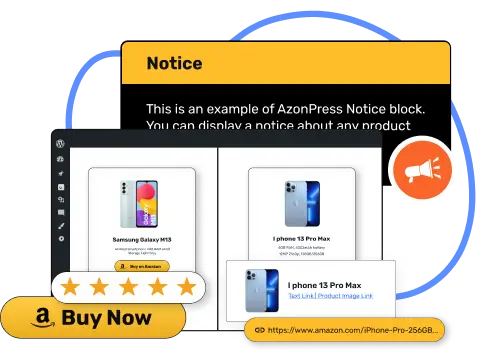
A converting Amazon product comparison table may look like the following.
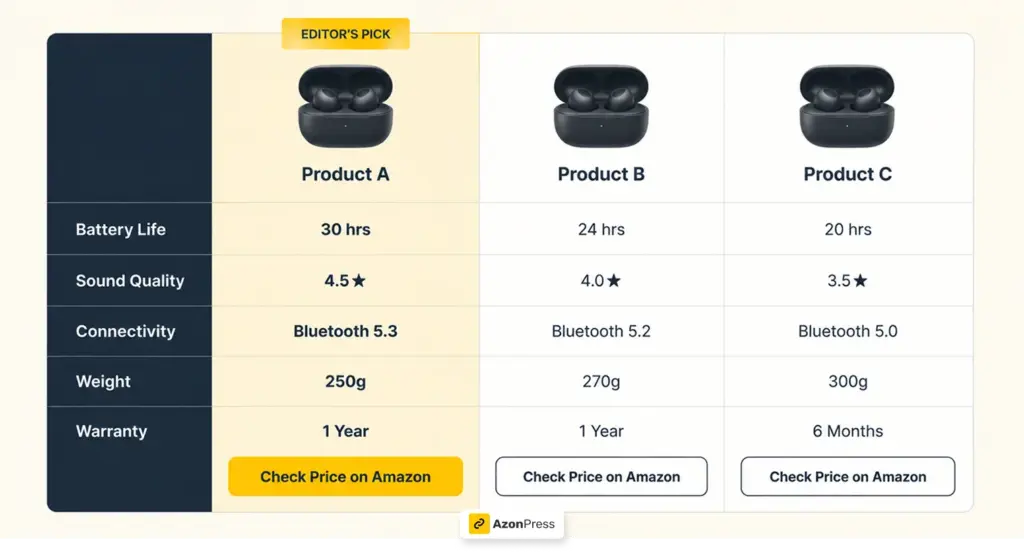
Here’s what separates a comparison that earns commissions from one that doesn’t:
The right number of products
Three to five products is the sweet spot. Fewer than three doesn’t give readers a real choice. More than five starts to feel overwhelming. If you have a long list to cover, break it into separate tables by budget range or use case rather than cramming everything into one place.
Attributes your audience actually cares about
Match the rows in your comparison table to the factors that drive the buying decision in that niche. For wireless earbuds, that’s battery life, sound quality, and price. For standing desks, it’s height range, weight capacity, and motor type. Don’t copy Amazon’s full spec sheet; curate it down to what actually matters.
Live pricing pulled from Amazon
Amazon prices change constantly. A table showing an outdated price doesn’t just look bad; it can get your affiliate account flagged. Amazon’s program policies require that prices shown on affiliate sites be sourced directly from the Amazon API and updated in real time. Manual price entry isn’t allowed.
A clear winner callout
Pick a top recommendation and label it “Best Overall,” “Editor’s Pick,” “Best Value.” Undecided readers need a nudge, and a visual callout provides it. It also tends to lift click-through rates noticeably, because people like validation before they commit.
A direct buy button per product
Every product in your comparison table needs a visible, clickable path to Amazon. Don’t make the reader hunt for the link after they’ve decided. A Buy on Amazon button in each row removes that friction entirely.
The compliance problem most affiliate bloggers ignore
Here is something that does not get enough attention in affiliate marketing guides: Amazon’s product data rules are strict, and most manually built comparison tables violate them.
Amazon’s Associates Program Operating Agreement requires that:
- Prices must be pulled from the Amazon API in real time, not entered manually
- Product images must come from Amazon’s approved sources, not saved and re-uploaded
- Availability data must be current; showing a product as “in stock” when it is not creates a compliance issue
For a blogger maintaining five or ten comparison posts across different niches, keeping all of this current manually is not realistic. Prices change daily. Products go out of stock. New variants appear.
This is the practical problem that sits underneath the question of how to compare Amazon products on your blog, and it is worth understanding before you decide how to build your tables.
Get access to our exclusive offers and pro tips!
How to compare Amazon products on your blog?
Building a working Amazon product comparison table on WordPress involves four things: finding the right products, pulling accurate data, choosing the right attributes to display, and embedding the table in a way that renders cleanly on mobile and desktop.
The cleanest way to handle all of this on a WordPress site is with a plugin that connects directly to the Amazon Creators API, Amazon’s current standard for affiliate product data, so your tables pull live information automatically rather than relying on manual entry.
Here is what that process looks like in practice:
- Search for products by name or ASIN: Rather than opening Amazon in a separate tab and copy-pasting titles and images, you search for products directly and import them. The plugin pulls the title, image, current price, star rating, and availability.
- Choose which attributes to display: Select the rows that match your niche and your readers’ buying criteria. Remove the ones that do not matter. Add custom fields if the default options do not cover what your audience cares about.
- Mark your top recommendation: Flag one product as your top pick with a visual badge. This gives readers a clear signal without you having to spell it out in the surrounding copy.
- Embed with a shortcode: The table is generated as a shortcode you paste into any WordPress post or page. It renders fully responsive and clean on mobile, readable on desktop, with a buy button per product that carries your affiliate tag.
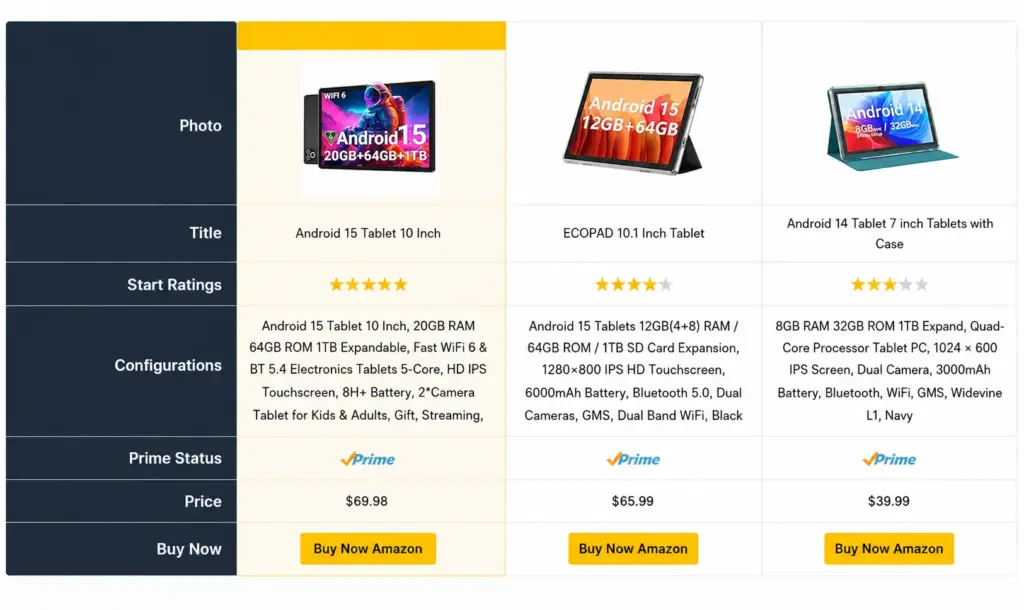
From that point, the table maintains itself. Prices update automatically through the API connection. You are not going back to individual posts every time Amazon changes a price or a product goes out of stock.
Click here to learn, “How To Create Amazon Product Comparison Table in WordPress?”
Compare Amazon products with AzonPress
A comparison table is only as good as the data behind it. Live pricing that goes stale, images that stop loading, products that go out of stock without updating any of these breaks the reader’s trust at the moment it matters most.
AzonPress built the comparison tables that stay accurate without you managing them manually. It connects to the Amazon Creators API, pulls product data in real time, and handles the compliance requirements that Amazon’s program policies require: prices and images always sourced from Amazon directly, never entered by hand.
For bloggers running multiple comparison posts across different product categories, this is what makes comparison content scalable. The work goes into building the table once. AzonPress handles keeping it current.
Here’s what AzonPress gives you out of the box:
- Amazon product comparison tables: Side-by-side, responsive, and auto-updating
- Product boxes and grids: For roundups and single-product callouts
- Bestseller lists: Auto-populated from Amazon’s category rankings
- “Our Pick” badges: To highlight your top recommendation visually
- Affiliate link generation: No manual link building needed
- Amazon API compliance built in: Prices and images always sourced correctly
It works on any WordPress site and doesn’t require any coding knowledge. Once you connect your Amazon Associates account to AzonPress via the Product Advertising API, your comparison tables build themselves.
Note on API access: Amazon now uses the Creators API in place of the older PA-API. AzonPress supports it fully connect your credentials once in the plugin settings and your tables will auto-populate with live prices, images, and availability.
To access the Creators API, your Amazon Associates account needs at least 10 qualifying sales in the last 30 days. Until then, you can still build and publish tables manually in AzonPress with no API required.
Tips to increase commissions from Amazon comparison content
A comparison table is a strong foundation. These tips will help you get more out of every comparison post you publish:
- Place the table near the top: Most readers visiting a comparison post scroll straight to the table and skip the surrounding text. If your Amazon product comparison table is buried at the bottom of a long post, you’re losing clicks. Put it in the top third of the article, right after a short intro.
- Add a “Who it’s best for” line per product: One sentence under each product explaining who it suits “Best for frequent travelers,” “Best if you’re on a tight budget” helps readers self-select quickly. Readers who feel seen are more likely to click through.
- Target “vs.” and “best” keywords alongside your table: Your affiliate product comparison content should target commercial investigation keywords: “[Product A] vs [Product B],” “best [product] under $100,” “best [product] for [use case].” These have high buying intent and pair naturally with comparison table content. Weave them into your H2s and body copy.
- Add a Quick Summary at the top: A three-bullet summary before the table naming your top pick, best budget option, and best premium pick gives impatient readers an immediate answer and positions your post for featured snippets on “best [product]” queries.
- Refresh your comparisons seasonally: Check your highest-traffic comparison posts before Prime Day, Black Friday, and the holiday season. New products launch, prices shift, and your top pick from six months ago might not be the best recommendation anymore. Updating these posts keeps them relevant and signals to Google that the content is actively maintained.
Wrapping up
Comparison content is not a trick. It is the format that matches what buyers are actually doing when they are close to a purchase, weighing their options before committing.
A well-built Amazon product comparison gives readers what they need to make a confident decision. That confidence is what drives the click. And keeping that table accurate over time with live pricing, current stock status, and up-to-date recommendations is what keeps it earning.
The mechanics of building and maintaining comparison tables at scale are where most affiliate bloggers stall. Getting the infrastructure right, so the content does its job without constant manual upkeep, is what makes comparison content a sustainable part of your affiliate strategy rather than a one-off effort.
Frequently asked questions
Here are some frequently asked questions regarding “Amazon product comparison”.
1. Can I manually enter Amazon prices in my comparison table?
No. Amazon’s affiliate program policies require that prices be sourced from the Amazon API and updated in real time. Manually entering prices violates their terms and risks account suspension.
2. How many products should I include in an Amazon product comparison?
Three to five is the right range for most niches. Fewer than three does not give readers a meaningful choice. More than five tends to overwhelm. If you have more to cover, split them into separate tables by price range or use case.
3. Do comparison tables actually improve affiliate commissions?
Consistently, yes. Comparison content captures readers in decision mode people who have already decided to buy and are choosing between specific options. That intent level converts at a meaningfully higher rate than general review traffic.
4. How often should I update my comparison posts?
The table data updates automatically through the API. For the surrounding content — your top pick, the product list, the attribute rows check quarterly and always before major shopping events like Prime Day and Black Friday.
5. What is the Amazon Creators API and do I need it?
The Amazon Creators API is Amazon’s current standard for affiliate product data, replacing the older Product Advertising API, which was retired in 2026. If you want your comparison tables to pull live prices, images, and availability automatically and stay compliant with Amazon’s program policies, you need an API connection. AzonPress handles this through its settings, so you connect your credentials once, and the plugin manages the rest.





Read Similar Blogs
We build lasting partnerships to boost and manage revenue growth





Leave a Reply